
BACnet Config Reference
Below is a comprehensive list of each configuration option on the BACnet driver with its default, a description of its purpose and what effect it will have.
The driver options are set on the Drivers screen. The options a tag uses to read and write a BACnet property are set per tag on the Tags screen, and are listed under Tag properties.
Minimum configuration requirements
These are the fields that need a value before the driver will do anything. Everything else has a working default.
| Field | Needed for | Notes |
|---|---|---|
| Driver Interface Name | All | The name tags refer to in Select Driver Interface. |
| Driver | All | Set to BACnet. |
| Local IP Address | Computers with several IPv4 interfaces | Empty binds all interfaces, which works only when the computer has one. |
| BBMD Address | Devices on other subnets | With Register with BBMD on. |
| Enable | All | The interface is not active until this is on and the changes are applied. |
| Device Instance, Object Type, Object Instance | Each tag | Set on the tag, not on the driver. Import BACnet Objects fills them for you. |
Driver interface
| Property | Default | Notes |
|---|---|---|
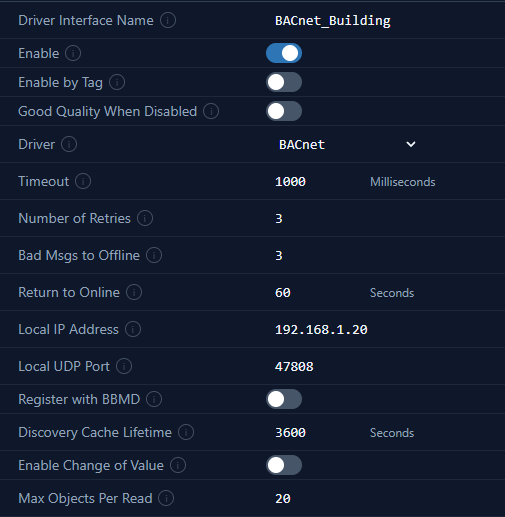
| Driver Interface Name | - | The name used to identify this driver interface. Tags reference it from their Select Driver Interface property. |
| Enable | on | Enable communications. Hidden when Enable by Tag is on. |
| Enable by Tag --> | off | Enable and disable the driver from a Boolean tag instead, named in the field beside it. |
| Good Quality When Disabled | off | On: tags on this driver keep good quality while the driver is disabled, and can be written to. Off: they go to bad quality. |
| Driver | Modbus | Set to BACnet to read and write BACnet/IP building automation devices. |
Communication
| Property | Default | Notes |
|---|---|---|
| Timeout | 1000 Milliseconds | The time to wait for a device to answer one request. |
| Number of Retries | 3 | The number of retries when a communication error occurs. |
| Bad Msgs to Offline | 3 | The number of bad messages that temporarily take communications offline. 0 leaves communications online. |
| Return to Online | 60 Seconds | How often to re-check communications after the interface has been taken offline. |
Network
| Property | Default | Notes |
|---|---|---|
| Local IP Address | blank | The IPv4 address of the network interface to bind, such as 192.168.1.20. Leave empty to bind all interfaces. Required on a computer with several IPv4 interfaces, virtual adapters such as Hyper-V, WSL, Docker or VPN included, so that WhoIs broadcasts leave on the right network. Left empty on such a computer, the endpoint cannot open and System Errors reports Configuration - 002. |
| Local UDP Port | 47808 | The UDP port the driver sends and listens on. 47808 (0xBAC0) is the BACnet/IP standard; keep it unless the network uses another port. |
Driver interfaces with the same Local IP Address and Local UDP Port share one socket. If another BACnet application on the computer already uses that address and port, the endpoint cannot open and System Errors reports Configuration - 002.
BBMD
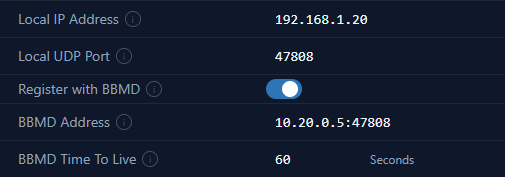
A WhoIs broadcast does not cross IP routers. To reach devices on other IP subnets, the driver registers as a foreign device with a BACnet Broadcast Management Device (BBMD), and also sends its WhoIs through it.
| Property | Default | Notes |
|---|---|---|
| Register with BBMD | off | Register as a foreign device with a BBMD to reach devices on other IP subnets. |
| BBMD Address | blank | The BBMD's host name or IP address, with an optional :port (47808 when omitted), such as 10.20.0.5:47808. Usually the BACnet router or building controller acting as BBMD. Shown when Register with BBMD is on. |
| BBMD Time To Live | 60 Seconds | How long each foreign-device registration is valid. The driver registers again at 80 percent of it. Shown when Register with BBMD is on. |
Discovery and reads
| Property | Default | Notes |
|---|---|---|
| Discovery Cache Lifetime | 3600 Seconds | How long a device address learned from an I-Am is trusted before the driver sends a fresh WhoIs. The known address stays in use in the meantime. Lower it for devices that get their address by DHCP. |
| Max Objects Per Read | 20 | The most object references in one ReadPropertyMultiple request. All the properties a group of tags needs from one object travel as one reference. Lower it for devices with a small APDU; 1 isolates a single bad object. |
When a device rejects a request with several objects, the driver falls back to one object per request for that device. Lowering Max Objects Per Read avoids the rejected requests. If a group of tags on one device goes bad together, lower it.
Change of Value
| Property | Default | Notes |
|---|---|---|
| Enable Change of Value | off | When on, tags with Use Change of Value on subscribe to their object instead of being polled. |
| COV Subscription Lifetime | 300 Seconds | How long each subscription lasts. The driver renews it at two thirds of the lifetime. Shown when Enable Change of Value is on. |
- Both settings are needed: Enable Change of Value on the driver and Use Change of Value on the tag.
- Notifications carry only the Present Value and Status Flags. Tags reading other properties of the object are polled at their Polling Rate.
- An object whose device rejects the subscription is polled.
- A device that restarts forgets its subscriptions; the next renewal restores them. A device that comes back from offline is subscribed again at once.
Tag properties
Set on the Tags screen, on the Value parameter.
| Property | Default | Notes |
|---|---|---|
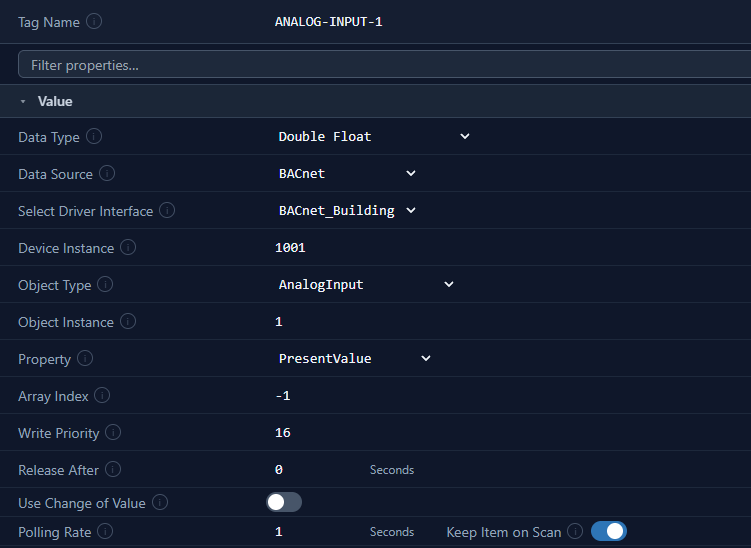
| Data Source | - | Set to BACnet. |
| Select Driver Interface | - | The BACnet driver interface the tag reads through. |
| Device Instance | 0 | The BACnet device instance number, 0 to 4194302. The driver finds the device's IP address with WhoIs. |
| Object Type | AnalogInput | The type of the object to read or write: AnalogInput, AnalogOutput, AnalogValue, BinaryInput, BinaryOutput, BinaryValue, Calendar, Device, Loop, MultiStateInput, MultiStateOutput, Schedule, MultiStateValue, Accumulator, CharacterStringValue, IntegerValue, LargeAnalogValue or PositiveIntegerValue. |
| Object Instance | 0 | The instance number of the object within the device, 0 to 4194302. Browse… beside it opens the Browse BACnet objects window, which lists the devices that answer WhoIs and their objects; select an object and click Use selected to fill Device Instance, Object Type and Object Instance. Discover again sends another WhoIs. |
| Property | PresentValue | The property to read or write: ActiveText, Description, InactiveText, MaxPresValue, MinPresValue, NumberOfStates, ObjectName, OutOfService, PresentValue, PriorityArray, Reliability, RelinquishDefault, StateText, StatusFlags or Units. Choose Custom to enter a raw property number. |
| Property Number | 0 | The raw BACnet property identifier. Shown when Property is Custom. 0 is acked-transitions, so the form warns until another number is entered. |
| Array Index | -1 | The element of an array property to read, or -1 for the whole property. |
| Write Priority | 16 | The BACnet command priority used when writing to commandable objects, from 1 (highest) to 16 (lowest). See Writes. |
| Release After | 0 Seconds | Seconds after a Present Value write is accepted until the driver releases its Write Priority by writing Null. 0 holds the value until the next write. |
| Use Change of Value | off | Subscribe to the object for Change of Value notifications instead of polling. Effective only when the driver has Enable Change of Value on. See Change of Value. |
| Polling Rate | 1 Seconds | How often the value is read when it is not delivered by Change of Value. |
Text properties, such as ObjectName, Description and StateText, and whole arrays (Array Index -1) need Data Type String.
Writes
A write to a tag is sent to its property on the device. On a commandable object, such as an analog, binary or multi-state output, the value goes into the priority array at the tag's Write Priority. The object's Present Value follows the highest-priority slot that holds a value, so a write at the default, 16, is overridden by anything at a higher priority.
With Release After set, the driver writes Null at the same priority that many seconds after the write is accepted, and the object returns to the next slot that holds a value, or to its Relinquish Default.
Import BACnet Objects
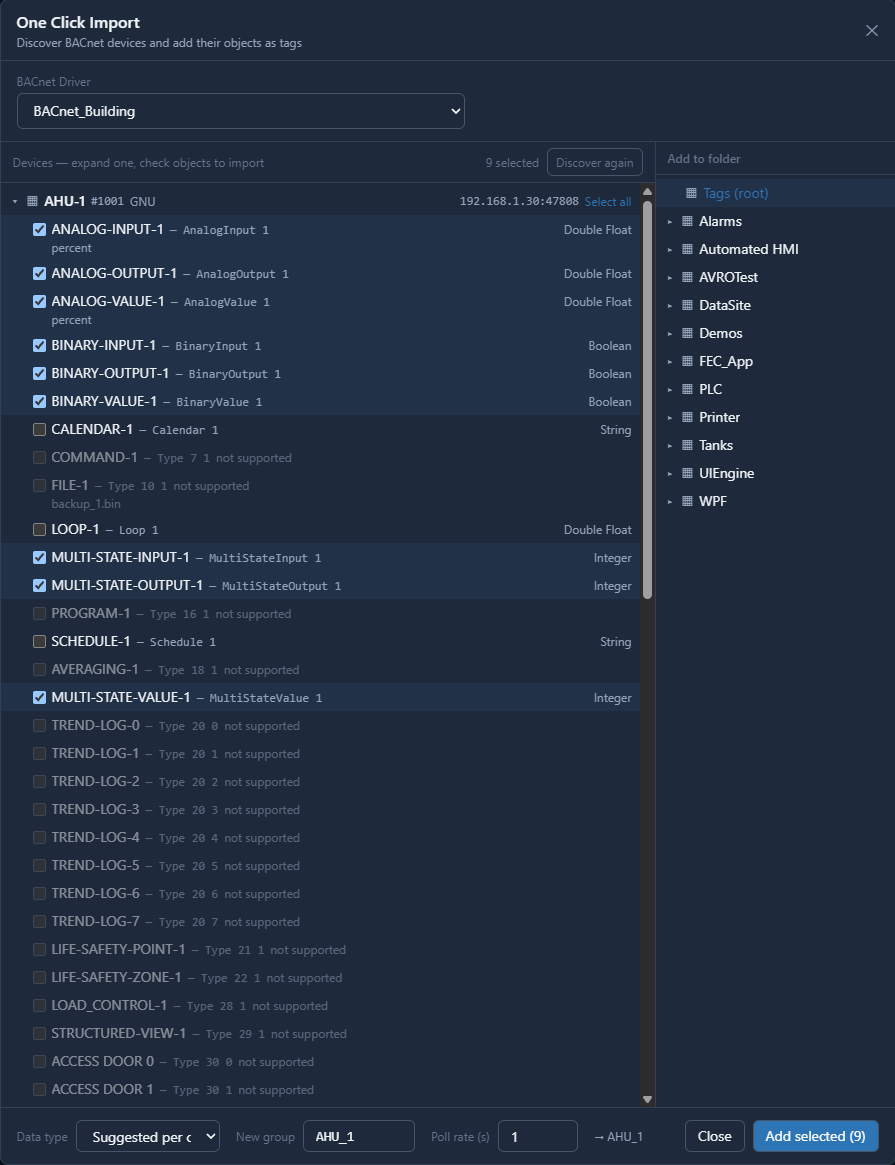
Import BACnet Objects, under One Click Import on the Tags screen, opens the One Click Import window, which discovers the devices on the network and adds their objects as tags. The driver interface must be enabled, applied and running.
| Field | Default | Notes |
|---|---|---|
| BACnet Driver | - | The BACnet driver interface to discover through. Selecting it sends a WhoIs and lists the devices that answer. |
| Discover again | - | Send WhoIs again and listen for answers for 6 seconds. |
| Devices — expand one, check objects to import | - | Expand a device to list its objects, and check the objects to add, or click Select all beside the device. The number selected is shown beside the heading, and the suggested data type beside each object. Objects of a type the driver does not read are greyed out and marked not supported. |
| Add to folder | Tags (root) | The group the new tags go in. |
| Data type | Suggested per object | Suggested per object gives Double Float to analog and loop objects, Boolean to binary objects, Integer to multi-state, integer and accumulator objects, and String to the rest. Or choose one type for every tag. |
| New group | blank | Optional. A new group to make under Add to folder for the tags. |
| Poll rate (s) | 1 | The Polling Rate given to every tag added. |
Add selected (N) adds a tag for each checked object, reading its Present Value. The window stays open and reports how many tags it added; Close closes it.
Licensing
BACnet is a licensed option, on OAS 22.4.0.0 or later. It needs a license key with the BACnet option, a License Host or a License Hub. Without it, every BACnet tag reads bad quality and System Errors reports License - 001.
Troubleshooting
| Symptom | Cause |
|---|---|
System Errors reports Configuration - 002 | The endpoint could not open. On a computer with several IPv4 interfaces, set Local IP Address. Otherwise another BACnet application uses the same address and port; change Local UDP Port or stop the other application. |
| The One Click Import window says the driver is not a running BACnet driver | The driver interface is not enabled, or its changes are not applied, or its endpoint could not open. |
| No devices answer WhoIs | The Local IP Address is not on the BACnet network, the firewall blocks the port, or the device is on another subnet. See Network and BBMD. |
| A group of tags on one device goes bad together | The device rejects requests that large. Lower Max Objects Per Read. |
| A tag reading a text property or an array is bad | It needs Data Type String. See Tag properties. |
| A tag with Use Change of Value is still polled | The driver's Enable Change of Value is off, the tag reads a property other than Present Value or Status Flags, or the device rejected the subscription. See Change of Value. |
| A write has no effect on the device | A higher priority holds a value. Raise the tag's Write Priority, that is, use a lower number. |
| A device that changed address stops answering | The old address is still trusted. Lower Discovery Cache Lifetime. |
Every tag is bad and System Errors reports License - 001 | See Licensing. |
Where next
- BACnet Driver - what the driver does and how it fits together.
- Getting Started with BACnet - these options in a working configuration.
- Device Connectors - the rest of the device connectors.