
Kafka Driver
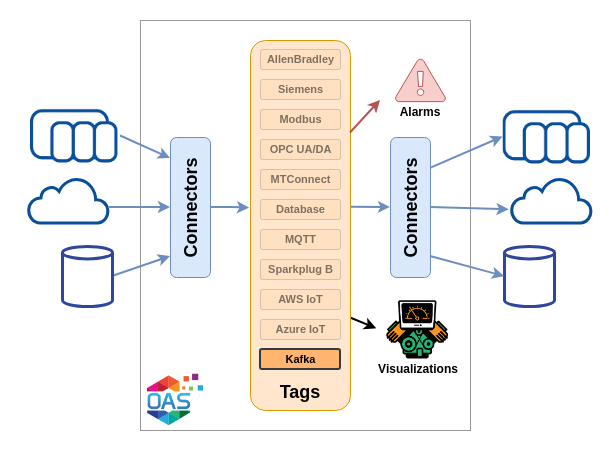
The OAS Kafka driver is both a producer and a consumer, against a cluster running on the local network or a hosted one such as Confluent Cloud. A tag can subscribe to a topic and take its value from the messages on it, and the same driver can publish selected tags to a topic on an interval, on a trigger, or at a time of day.
| Property | Description |
|---|---|
| Direction | Read and write. Tags subscribe to a topic through the driver; the driver publishes selected tags to a topic. |
| Transport | Kafka protocol to one or more bootstrap servers |
| Security | Plaintext, SSL, or SASL - including a Confluent Cloud API key and secret |
| Buffering | Store and Forward, buffered to disk and forwarded when communication is restored |
| Failover | A second, independent cluster the driver moves to when the primary connection fails |
| Licensing | Requires the Kafka licensed option, on OAS 18.0.0.4 or later |
Getting Started
Stand up a test cluster, read a topic into a tag, then publish tags back to one.
Config Reference
Every parameter on the Kafka driver and what it does.
Videos
The connector introduction and the full producer and consumer walkthrough.
How-To Guides
Step-by-step guides for logging, transferring and routing Kafka data.
Kafka Consumer
In a consumer configuration you set the Kafka driver parameters to connect to a cluster, then create tags whose Data Source is Kafka. Each tag names the Topic it subscribes to, and takes its value from the messages published there. A consumer tag is a String or a JSON tag, so a JSON payload can be parsed into its members rather than held as text.
Consuming needs no publishing configuration on the driver - a driver interface with nothing selected to publish is a perfectly good consumer.
Kafka Producer
A producer configuration is the same driver with Publish Selected Tags turned on. The tags listed in Tags To Publish are published to a topic on a configurable interval, when a boolean trigger tag changes, or at a set time of day, and the JSON payload each message carries is yours to shape.
Tags can be published individually or combined into a single topic, with the tag identifier, value, quality and timestamp each named by a field you choose. Messages can also be published against a schema instead: ISA-95 Lite, a built-in record aligned with the ISA-95 equipment hierarchy for a unified namespace, or a Custom AVRO Schema of your own, with or without a Confluent Schema Registry.
Connection
A connection is defined by its bootstrap servers and its security protocol. Plaintext is the usual choice for a cluster on the local network; a hosted cluster will want SSL or one of the SASL protocols, where the SASL user name and password are the API key and secret issued by the provider.
Acknowledgement strategy, client identifier and compression are set on the same screen, alongside the batching, buffer, timeout, socket and transaction settings that tune throughput against latency. Each parameter is listed in the Config Reference.
Store and Forward
When the driver cannot reach the cluster, Store and Forward buffers values to a directory on disk rather than discarding them, and forwards them once communication is restored.
Failover
With failover enabled the driver is given a second cluster - its own bootstrap servers, its own security and its own Schema Registry - and moves to it when the primary connection fails.
Videos
- Apache Kafka Connector - two minutes on what the connector does and where it fits.
- Kafka IIoT - the full producer and consumer walkthrough, indexed by chapter.
Both are on the Videos page.
Related How-To guides
- Kafka Videos - the connector introduction and the full walkthrough.
- Kafka How-To guides - every guide that reads from or writes to Kafka.
- IoT Connectors - the rest of the cloud, broker and streaming connectors.