
MQTT Videos
Six videos cover MQTT in OAS. Two are three minute introductions, one to the connector and one to the broker built into the engine. The other four are walkthroughs: connecting to a third party broker as a client, connecting a client to the OAS broker, publishing selected tags, and setting up a failover interface.
MQTT Connector

An introduction to the connector as a whole. OAS works as both an MQTT client and an MQTT broker: it publishes data to third-party brokers, receives data from them and parses the JSON payloads that arrive.
Watch it to decide whether the driver fits what you are building, then go to Getting Started to build it.
MQTT Broker

An introduction to the broker built into the OAS engine, which gives third-party MQTT clients access to the data OAS collects from Modbus, Allen Bradley PLCs, Siemens S7 controllers, OPC UA and OPC DA servers, MQTT, Sparkplug B, MTConnect, Kafka, AWS IoT Core and databases. The data is provided in JSON payloads or as a Sparkplug B EoN.
The broker is described under MQTT Broker on the overview page.
MQTT Client

How to connect to a third party MQTT broker - the driver that this section of the documentation covers. It sets up the MQTT client to subscribe to data from a broker and to publish data to it.
The written equivalent is Getting Started, which does the same against a public broker.
Info
The walkthrough was recorded in September 2020 and shows the driver screen as it was then. Options added to the driver since do not appear in the video; the Config Reference lists the current set.
OAS MQTT Broker

How to connect to the OAS MQTT broker for local and remote tag values. It explains what the broker is and where it is built in, checks the MQTT licence, sets OAS up as a broker, subscribes an MQTT client to it, and finishes by sending a JSON message from the client back to the broker.
Chapters
| Time | Chapter | Covered in |
|---|---|---|
| 0:00 | Introduction - OAS as MQTT Broker | MQTT Broker |
| 0:15 | OAS as MQTT Client and MQTT Broker | MQTT Driver |
| 0:20 | MQTT Client | Subscribe to external broker topics |
| 0:40 | MQTT Protocol | - |
| 0:44 | What's MQTT Broker | - |
| 0:58 | Where is built MQTT Broker | MQTT Broker |
| 1:07 | What MQTT Broker support and requires | MQTT Broker |
| 1:29 | How to Interface MQTT Client with OAS as an MQTT Broker | - |
| 1:41 | How to verify if you have a valid license for MQTT | MQTT Broker |
| 2:07 | Set up OAS as a MQTT Broker | Set up the broker |
| 3:23 | Set up to Subscribe to OAS MQTT Broker | Connect a client |
| 5:54 | Sending a JSON message to the OAS MQTT Broker from MQTT Client | Write to a tag |
| 7:08 | More information | - |
Info
The walkthrough was recorded in August 2020 and shows the broker options as they were then. The broker is not set on the driver screen - its options, as they are today, are listed on the MQTT Broker page.
IoT Publish
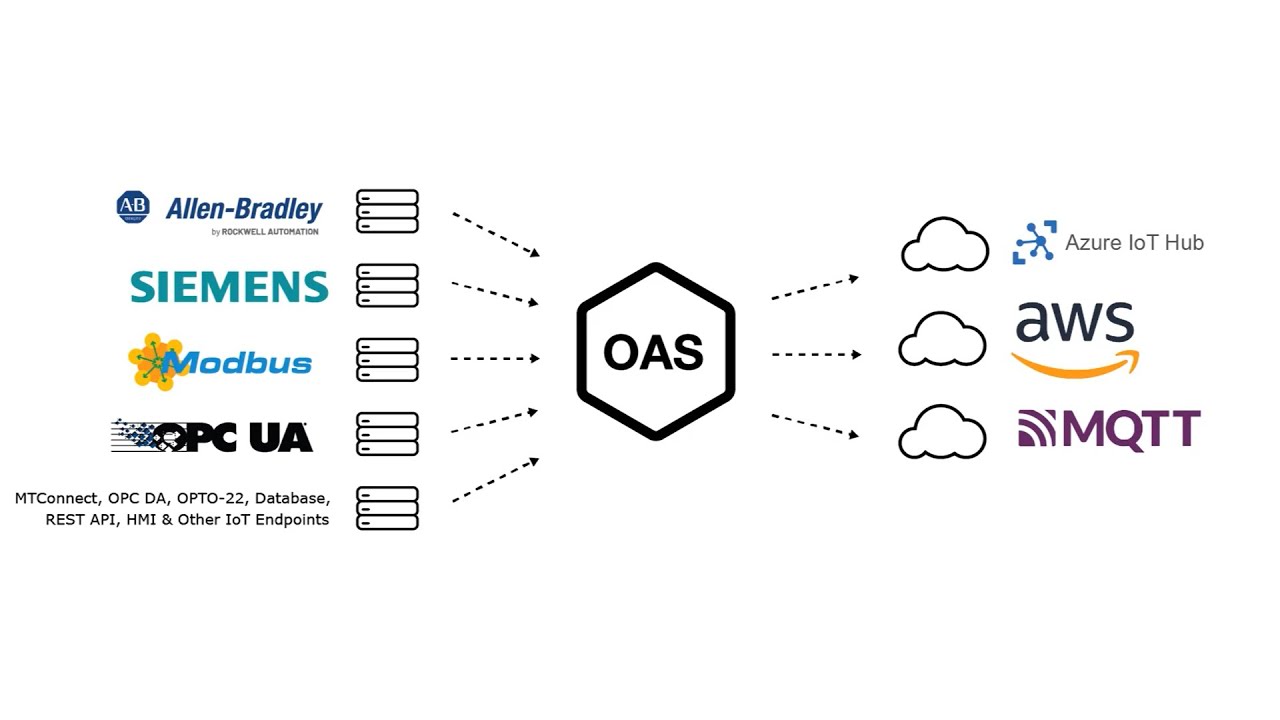
How to publish data to Azure IoT Hub, AWS IoT Gateway and MQTT brokers. It configures Azure IoT first and goes through Publish Selected Tags there, then does a bulk publish to AWS IoT and a bulk publish to an MQTT broker.
The MQTT part starts at 9:33 and brings in MQTT Explorer at 10:29. If you only want MQTT, watch Publish Selected Tags at 1:53 for the options and then skip to it.
Chapters
| Time | Chapter | Covered in |
|---|---|---|
| 0:00 | Introduction | - |
| 0:23 | Set up Tags in OAS | - |
| 0:41 | Configure Azure IoT | - |
| 1:53 | Publish Selected Tags | Publishing |
| 5:31 | Visual Studio Code | - |
| 8:00 | Step by step instructions | - |
| 8:12 | Bulk Publish to AWS IOT | - |
| 9:21 | Step by step instructions / Publish Data to AWS IOT Gateway | - |
| 9:33 | Bulk Publish to mqtt broker | Configure MQTT Publishing |
| 10:29 | MQTT Explorer | Verify Messages are Published to MQTT Broker |
| 11:20 | Step by step instructions / Getting Started MQTT | Getting Started with MQTT |
| 11:34 | Save button of the OAS Configuration tool | Save the configuration |
| 12:11 | Additional Questions | - |
Info
The walkthrough was recorded in April 2022 and shows the driver screen as it was then. Options added to the driver since do not appear in the video; Publishing lists the current set.
Driver Failover
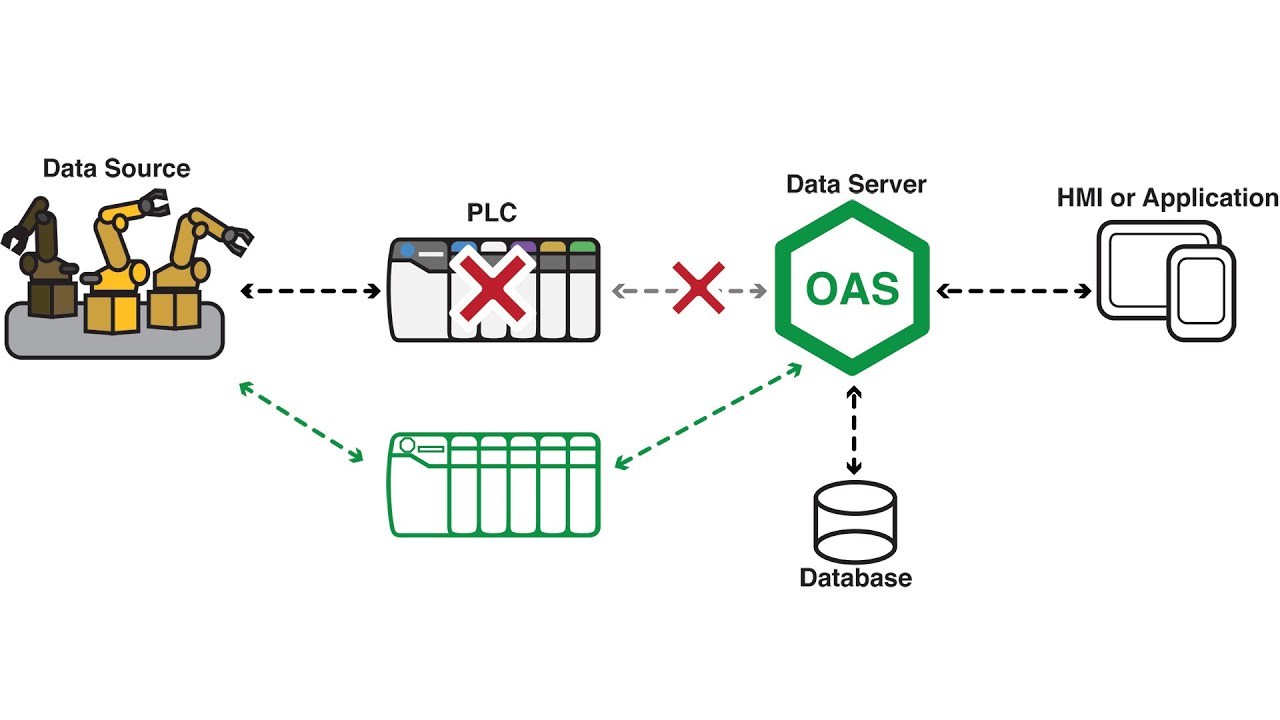
How to set up a failover interface. It is not specific to MQTT - the same video covers Modbus, Allen Bradley, Siemens S7, OPC UA, Azure IoT, AWS IoT and MTConnect - but MQTT is one of the drivers it applies to. The MQTT failover options are listed under Failover.
Info
The walkthrough was recorded in December 2020 and shows the driver screen as it was then.
Where next
- Getting Started with MQTT - a subscriber and a publisher in written form, against a public broker.
- Config Reference - every parameter on the driver, with its default.
- Videos - the full OAS video library.