
Snowflake Config Reference
Below is a comprehensive list of each configuration option on the Snowflake driver with its default, a description of its purpose and what effect it will have.
The Snowflake objects the driver expects to find - the account identifier, the user and role, the table, the grants and the pipe - are covered under Getting Started, along with the key pair or token it authenticates with. Do that first; most of the field values below come from it.
Minimum configuration requirements
These are the driver fields that need a value before the driver will connect. Everything else on the driver has a working default.
| Driver field | Example | Where the value comes from |
|---|---|---|
| Account Identifier | abcdefg-xy12345 | The subdomain of your Snowflake URL - see Account identifier |
| Authentication Type | Key Pair JWT | The driver default. See Authentication |
| User | OAS_SVC | The Snowflake user you create. Key-pair only - a token identifies its own user |
| Private Key PEM or Private Key Path | generated by the driver | Generate Key…, or a key pair you already have |
| Programmatic Access Token | - | Only if you chose token authentication instead of a key pair |
| Database | OAS_DB | Created in Snowflake |
| Schema | OAS_DATA | Created in Snowflake. Deliberately not defaulted to PUBLIC |
| Table | OAS_TAG_VALUES | Created in Snowflake, or by the driver - see Table creation |
| Column Mapping | the Default preset plus the three metadata columns - seven in all | The mapping editor |
| Tags to Publish | your own tags | The tag picker. Leaving this empty is a configuration error |
Pipe, Channel Name, Account Host Override and Ingest Host Override are left blank on a normal installation. Each is described under Connection and Target.
Connection
| Property | Default | Notes |
|---|---|---|
| Account Identifier | - | The subdomain of your Snowflake URL, including the hyphen. Case-insensitive. Not the locator. |
| Account Host Override | blank | Replaces the host built from the identifier. For PrivateLink, government regions, or a legacy locator needing region and cloud segments. Host name only. |
| Authentication Type | Key Pair JWT | Key-pair does not expire, which is why it is the default for something that runs unattended. |
| User | - | Key-pair only; a token identifies its own user. |
| Private Key PEM / Path / Passphrase | blank | Paste the key, or point at a file. Leave the passphrase blank for an unencrypted key. |
| Programmatic Access Token | blank | Expires. Record the expiry date and replace it before streaming stops. |
| Ingest Host Override | blank | Snowflake assigns each account a separate streaming host and the driver discovers it on every connect. Set this only where the discovered host is unreachable, such as over PrivateLink. When set, the driver uses it exactly and reports a failure rather than quietly finding another host. |
Target
| Property | Default | Notes |
|---|---|---|
| Database / Schema / Table | - | Text fields; the driver does not browse the account. Schema is deliberately blank rather than PUBLIC. |
| Pipe | blank | Blank uses the default <TABLE>-STREAMING pipe. |
| Channel Name | blank | Blank generates one from the node and driver interface names. |
| Create Table If Missing | off | Creates the table from the column mapping on connect. Needs CREATE TABLE on the schema. |
| Fail On Uncommitted Rows | off | Refuse to open or drop a channel that still has rows in flight from a previous session. |
| Column Mapping | the Default preset plus the three metadata columns | The whole output contract. Edited through the mapping editor, stored as JSON. |
Important
Two engines using the same channel name against the same pipe will disconnect each other. Leave Channel Name blank unless you have a specific reason not to.
Publishing
There is no Publish Selected Tags switch on this driver - publishing is all it does, so the switch is hidden.
| Property | Default | Notes |
|---|---|---|
| Tags to Publish | - | Individual tags, or a group rule written by the tag picker where * matches one level and ** any depth. Rules re-resolve on start and on change. |
| Publish Type | Continuous | Continuous · Event Driven (with a Trigger Tag and Digital Trigger Type) · Specific Time of Day. |
| Publish Interval | 10 s | Continuous only. |
| Publish On Startup | on | |
| Publish Latest Value Only | on | Turn this off for a historian target, so that no intermediate change is discarded. |
| Include All Tags Each Publish | off | |
| Include Tags For Period | off | |
| Override Value When Bad | None | Hold the last good value, set a fixed value, or hold then set. |
| Enable Store and Forward | off |
Info
A driver with no tags selected is a configuration error, not an idle driver. It reports "Snowflake driver is not fully configured: Tags To Publish (no tags are selected)" rather than connecting and streaming nothing. A group rule that currently matches no tags counts as none.
Batching and transport
Rows accumulate and are sent when any of three limits is reached.
| Property | Default | Notes |
|---|---|---|
| Max Tags Per Publish | 1000 | Rows in one append request. |
| Max Request Bytes | 3145728 | Uncompressed size of one append. Deliberate headroom under Snowflake's hard limit. |
| Max Latency | 1000 ms | How long to accumulate when neither other limit is reached. Lower is more responsive; higher gives larger, better-compressed batches that are cheaper to query. |
| Compression | Gzip | Zstd is about half the size of Gzip for the same processor time. None is for debugging, so the payload can be read as it is sent. |
| Request Timeout | 30000 ms | |
| Max Retries | 3 | Only failures that may resolve on their own are retried - a rate limit, a temporary server error - never a rejection. |
| Retry Backoff | 500 ms | Initial delay; increases with each attempt. |
Important
Changing Max Latency, Max Retries, Retry Backoff or Max Tags Per Publish does not drop the channel.
Changing the account, host, credential, database, schema, table, pipe, channel name, compression or request timeout does, because those identify the channel - and dropping the channel restarts STREAM_OFFSET at zero. Keep that in mind when experimenting on a live driver.
Test Connection
Test Connection performs exactly three checks and reports each separately, along with the account host it built, the ingest host Snowflake returned and the User-Agent it sent.
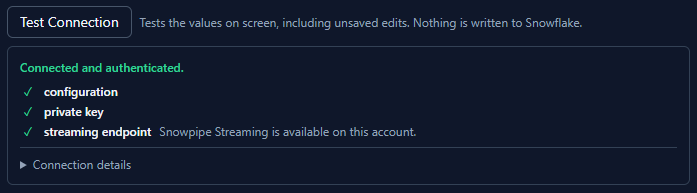
| Check | What it proves |
|---|---|
| configuration | The fields needed for the chosen authentication type are filled in |
| private key | The key was read, decrypted if encrypted, and successfully signed a token. Skipped for token authentication. |
| streaming endpoint | Snowflake answered an authenticated request - so the host is reachable and the credential is accepted |
Info
Test Connection proves you can reach Snowflake as this user. It does not open a channel and does not touch your database, schema or table, so it cannot tell you whether the table exists or whether the mapping matches it.
Column mapping
Sources
Each column takes a source, and that source - with the column's format - is what actually fills the row.
| Source | Fills the column with |
|---|---|
| Tag Property | Value, Timestamp, Tag Name, Tag Path, Group Path, Quality, Quality Severity, Data Type, or any named custom tag property |
| Hierarchy | An ISA-95 level, resolved from the groups enclosing the tag |
| Constant | A fixed value |
| System Timestamp | The engine clock at row build. Publishing both this and the tag timestamp makes latency measurable. |
| DB Timestamp | The column is omitted from the row entirely, so Snowflake's own DEFAULT CURRENT_TIMESTAMP() fires. Sending a null instead would override the default. |
| UUID | A fresh identifier per row, hyphenated or compact |
| Pipe ID / Channel ID / Stream Offset | Ingestion metadata, filled in by the driver |
| Null / Ignore | The column is omitted from the row |
The ISA-95 levels available are Enterprise, Site, Site ID, Area, Work Center, Work Center Type, Work Unit, Work Unit Type, Work Unit ID, Equipment Module, Equipment Module ID, Control Module and Control Module ID.
Formats
Timestamp columns take ISO 8601, Unix seconds, Unix milliseconds, ticks, or a custom .NET format string. Value columns take as-is, force to string, parse as numeric, round to integer, true/false, 0/1, or a custom pair of boolean words. Timestamps are sent as UTC.
Info
The Snowflake type dropdown does not change what is sent. It drives the generated CREATE TABLE and nothing else. Changing a column's type does not change its value; changing its tag property does.
Note also that Tag Name returns the last two components of the tag path. On a two-level tag it is identical to Tag Path.
Presets
Two presets are built in, served from the engine so that the editor and the driver cannot hold different ideas of what they mean.
Default - four columns matching the table above:
| Column | Type | Source |
|---|---|---|
id | STRING | Tag Property → Tag Path |
value | VARIANT | Tag Property → Value, as-is |
quality | BOOLEAN | Tag Property → Quality |
timestamp | TIMESTAMP_NTZ | Tag Property → Timestamp, ISO 8601 |
The identifier column carries the full tag path, not the short name: names are not unique across groups, and using one as a row key silently merges different tags.
ISA-95 Lite - 24 flattened columns: timestamp, namespace path, tag name, group path, all thirteen ISA-95 levels, three typed value columns, data type, quality, units and source protocol. The hierarchy is flattened one column per level because Snowflake columns are flat and a dotted column name would have to be quoted forever after. The typed value columns (value_double, value_string, value_boolean) are split rather than sharing one VARIANT because Snowflake sub-columnarizes a VARIANT only along paths that are never null.
A preset row is byte for byte an ordinary row. Applying a preset is an editor action, not a mode - afterwards you can edit, add and remove columns freely. Clearing the mapping means no columns, not "fall back to Default".
Ingestion metadata columns
+ Metadata Columns adds three entries whose name, type and source are locked in the editor.
| Column | Type | Meaning |
|---|---|---|
PIPE_ID | STRING | Which pipe produced the row |
CHANNEL_ID | STRING | Which channel - that is, which engine and driver interface |
STREAM_OFFSET | BIGINT | The row's position in that channel's ordered sequence |
Snowflake recommends these on any streaming table, and they are what makes gap detection possible in SQL:
SELECT STREAM_OFFSET,
       LAG(STREAM_OFFSET) OVER (PARTITION BY PIPE_ID, CHANNEL_ID
                                ORDER BY STREAM_OFFSET) AS previous_offset
FROM   <db>.<schema>.<table>
QUALIFY STREAM_OFFSET <> previous_offset + 1;
They are locked because that query names them literally, and STREAM_OFFSET has to stay numeric or previous_offset + 1 fails outright. The driver binds them by source rather than by name, so a mapping that arrived through a CSV import or a hand edit still works.
Important
Map CHANNEL_ID whenever you map STREAM_OFFSET. Offsets are only meaningful within a channel; with two engines writing to one table, offsets alone are indistinguishable and every row looks like a gap.
SQL View
SQL View shows the CREATE TABLE statement the mapping describes, generated by the engine, so that what you hand a DBA is the same statement the driver would have used itself.
Table creation
Create Table If Missing is off by default. Ticked, the driver creates the target table from the column mapping on connect if it is not there.
- It needs
CREATE TABLEon the schema - a privilege streaming alone does not require. - OAS never alters or drops an existing table. A table whose columns do not match the mapping is left exactly as it is, and reported by preflight.
- If the table cannot be created the driver stops, reports the error and sends nothing.
Info
Turning it off does not stop the driver reading table metadata. One metadata read happens on connect either way, because preflight uses the same answer - only the create is gated on this switch. If the credential is refused that read, nothing breaks: preflight reports that it could not check, and streaming proceeds.
Store and Forward
Tick Enable Store and Forward. Rows that cannot be sent are written to disk and replayed when the connection returns, oldest first, always. Buffer files are plain UTF-8 NDJSON with a .sfb extension, in the directory set under Configure → Options → Store and Forward.
Last In First Out is deliberately not offered on Snowflake. Snowpipe Streaming is an ordered protocol - a channel's rows are identified by a monotonic offset - so replaying the newest file first would land recent rows ahead of older ones under offsets that say the opposite.
A buffered row carries no offset of its own. It takes one when it is finally sent, which is what makes it land after whatever Snowflake actually kept.
Validation and row errors
An append returning success means Snowflake accepted the batch, not that it kept it. Rows are validated asynchronously against the table, so a wrong column mapping streams happily and writes nothing at all. Two mechanisms close that hole, and they catch different faults.
| Fault | Snowflake's response | Seen by |
|---|---|---|
| A value that cannot convert to its column's type | Rejected, counted, message returned | Validation |
| A column name in the mapping that is not in the table | Silently discarded, error count zero. The row lands with that column absent. | Preflight only |
Rejected rows cannot be resent. Fix the mapping or the table.
Preflight
On every connect - and again after any mapping change - the driver compares the mapped column names against the table's actual columns and reports the ones that are missing, by name. A mapping change does not reconnect the driver, so a connect-only check would leave the alarm latched after the operator fixed the very thing it complained about.
Preflight is advisory and never blocks a connect. Reading table metadata needs a privilege that streaming does not, so a least-privilege credential that streams perfectly well can be refused it. An unreadable answer is treated as "could not check", never as "the table has no columns". The comparison is case-insensitive, because Snowflake upper-cases unquoted identifiers, and it compares names only, never types.
Validation
Validation polls the channel's status and reports what Snowflake actually did with the rows.
| Property | Default | Notes |
|---|---|---|
| Enable Validation | off | Poll continuously. This is the only setting on this driver that sends a repeating request to Snowflake for as long as the driver is enabled. |
| Validation Interval | 300 s | Seconds between polls, per driver instance. 300 s is roughly 288 requests per day; 30 s is ten times as many, for detection nine minutes sooner. |
| On Row Errors | Raise System Error | Log Only - write to the driver log. Raise System Error - raise an OAS system error carrying Snowflake's own message. Raise And Set Comm Bad - also fail the interface, which triggers Store and Forward. |
Important
Enabling validation, and shortening its interval, directly multiplies how often the driver contacts Snowflake. How Snowflake meters and prices its services is set by Snowflake and can change. Review your agreement and confirm the cost with Snowflake before enabling this - particularly at a short interval, or across many drivers.
A one-shot check runs whether or not validation is enabled, about ten seconds after the first append of each connect. That is why a broken mapping is reported on the first attempt rather than never. It honours the On Row Errors setting even though that field is hidden while validation is off.
Five optional metric tags can be written on each poll:
| Tag | Value |
|---|---|
| Rows Inserted | Rows Snowflake has committed for this channel |
| Row Error Count | Rows Snowflake has rejected. Alarm on this to be notified of a schema mismatch. |
| Last Error Message | The most recent message from Snowflake |
| Processing Latency | Average time Snowflake takes to process rows, in milliseconds |
| Last Committed Offset | The last offset token Snowflake has committed |
The counters are cumulative for the life of the channel, and the channel outlives the driver. The driver therefore measures errors from the moment it connects, so old rejections are not re-raised on every enable. A count that has gone backwards means a new channel.
Delivery guarantees
The channel carries the memory of what has been committed, so the driver does not delete its channel when it stops. It drops a channel only when abandoning its identity - a change of account, host, credential, database, schema, table, pipe, channel name, compression or request timeout - because that channel then names something it will never write to again.
Verify delivery with both checks together, since a duplicate and a loss cancel out in a gap count alone:
SELECT COUNT(*)                      AS rows_kept,
       COUNT(DISTINCT STREAM_OFFSET) AS distinct_offsets,
       MIN(STREAM_OFFSET)            AS first_offset,
       MAX(STREAM_OFFSET)            AS last_offset
FROM   <db>.<schema>.<table>
WHERE  CHANNEL_ID = '<channel>';
rows_kept equal to distinct_offsets, and last_offset - first_offset + 1 equal to both, is the proof. Observed commit latency is typically 5 to 7 seconds.
Operating the driver
Comm status. The usual Comm Bad, Comm Good and Comm Buffering driver tags behave as they do on every driver, so alarms need no new configuration.
System errors are latched per category and clear themselves when the condition goes away. Licensing, configuration problems, preflight mismatches and row rejections each report with the driver name, the target table and, where Snowflake supplied one, its own message.
Logging is opt-in. Tick Configure → Options → System Logging → Log Snowflake Communications to record the driver's activity to Log/OASTransactions-Driver-<name>-<date>.txt. It is off by default, so turn it on before trying to diagnose anything from the log.
One line in that log is worth knowing about. When the resolved column mapping changes, the driver writes:
Snowflake rows will be built from N mapped columns: ...
That is the receipt proving a mapping edit actually reached the running engine. It is written only when the mapping changes, so its absence after an edit means the edit did not arrive.
Troubleshooting
| Symptom | Cause |
|---|---|
| Driver never connects, no Snowflake activity at all | Check the license first. An unlicensed driver is refused before any configuration is examined. |
401 on connect, credentials look right | The public key is not registered against this user, the account identifier is the legacy locator rather than the URL subdomain, or the host clock is fast enough that the token looks issued in the future. Verify the fingerprint before anything else. |
| Authentication worked yesterday, fails today | A Programmatic Access Token expired. |
| The key file will not load | Check the first line. -----BEGIN RSA PRIVATE KEY----- with Proc-Type: 4,ENCRYPTED beneath it is the one unsupported key format. Also check the service account can read the file. |
| Good comms, no rows in the table | Almost always the tag selection or the mapping. Check the driver is not reporting no tags are selected, then look for a preflight system error naming columns that are not in the table. |
| Rows arrive, one column is always empty | That column name is not in the table. Snowflake discards the unknown key silently with an error count of zero, so only preflight sees it. Fix the mapping or add the column. |
| Table not found or not authorized | The table does not exist, or the role lacks INSERT on it. Snowflake does not distinguish these. |
| Rejections reported, message names a type | A value cannot convert to the column's type. Check that column's Tag Property and format - not its Snowflake type, which affects only DDL. |
STREAM_OFFSET restarted at zero | The channel was dropped. Something in the channel identity changed - including Compression or Request Timeout - or two engines are using the same channel name against one pipe. |
| Test Connection succeeds, the driver does not | Test Connection checks credentials and reachability only. It does not open a channel and never touches your database, schema or table. |
| A mapping edit seems to have no effect | Turn on Log Snowflake Communications and look for the Snowflake rows will be built from N mapped columns line. No line means the edit did not reach the engine. |
| The driver log is empty | Logging is off by default. Tick Log Snowflake Communications. |
Limits and caveats
- Write only. The driver never reads from Snowflake into a tag.
- Flat rows. Snowflake columns are flat and there is no nested output. Use a VARIANT column if you need structure inside one field.
- No second target. An outage is ridden out by Store and Forward, not by streaming to a different table. A deployment with genuine multi-region Snowflake uses Snowflake's own Client Redirect, which needs Account Host Override, not a second target here.
- Idle channels. Snowflake decides how long an idle streaming channel is retained, and can change that. The driver reopens and resumes from the committed offset, so an idle period costs nothing - but no claim is made about how long a channel survives untouched.
- Two engines, one channel name. They will disconnect each other.
- No account browsing. Database, Schema and Table are text fields, by design.
- No role selection. The driver uses the user's default role.
- Credential storage. The private key and any access token are stored in the driver configuration alongside every other driver property, and travel over the configuration API. That API should be on TLS. Encrypting the private key adds little when the key is pasted into the configuration, because the passphrase sits beside it; it is worth doing when the key lives in an external file.
Where next
- Snowflake Driver - what the connector does and how it delivers.
- Getting Started - preparing the account and the credential.
- Snowflake How-To Guides - step-by-step guides for every source.