
oBIX Config Reference
Below is a comprehensive list of each configuration option on the oBIX driver with its default, a description of its purpose and what effect it will have.
The driver options are set on the Drivers screen. The options a tag uses to address an oBIX object are set per tag on the Tags screen, and are listed under Tag properties. The oBIX server built into the OAS engine is configured on the Options screen, not on the driver, and has its own page: oBIX Server.
Minimum configuration requirements
These are the fields that need a value before the driver will do anything. Everything else has a working default.
| Field | Notes |
|---|---|
| Driver Interface Name | The name tags refer to in Select Driver Interface. |
| Driver | Set to oBIX. |
| Lobby URL | Blank by default. The URL of the server's Lobby, for example https://host/obix/. |
| User Name | The user the driver signs in as. That user's rights on the server decide which points OAS can read and write. |
| Password | The password of that user. |
| Enable | The interface is not active until this is on and the changes are applied. |
| Href | Set on the tag, not on the driver. |
Driver interface
| Property | Default | Notes |
|---|---|---|
| Driver Interface Name | - | The name used to identify this driver interface. Tags reference it from their Select Driver Interface property. |
| Driver | Modbus | Set to oBIX to read and write points on an oBIX server. |
| Enable | on | Enable communications. Hidden when Enable by Tag is on. |
| Enable by Tag | off | Enable and disable the driver from a Boolean tag instead. |
| Good Quality When Disabled | off | On: tags on this driver keep good quality while the driver is disabled, and can be written to. Off: they go to bad quality. |
| Return to Online | 60 Seconds | How often to re-check communications after the interface has been taken offline. |
Connection
| Property | Default | Notes |
|---|---|---|
| Lobby URL | blank | The URL of the oBIX server's Lobby, for example https://host/obix/. An https URL turns TLS on. Plain http works, but credentials and values travel in clear text and a warning is logged. |
| User Name | blank | The user name the driver signs in with, by HTTP Basic authentication. |
| Password | blank | The password for that user. |
| Timeout | 1000 Milliseconds | How long to wait for each reply from the server. 5000 or more is recommended, since 1000 is short for a server answering a batch of many points. |
| Connection Timeout | 2500 Milliseconds | How long to wait for the connection to the server. |
| Number of Retries | 3 | The number of retries when a communication error occurs. |
| Server Certificate File | blank | The server's certificate, or the CA certificate it chains to, for an https Lobby whose certificate Windows does not trust, such as a station's self-signed certificate. Inspect shows the details of the certificate in the file. |
| Allow Invalid Certificate | off | Accept a server certificate that fails security verification, for an https Lobby. An accepted invalid certificate is logged as a warning. Prefer Server Certificate File; this is meant only for testing. |
Test Connection
Test Connection, below the Lobby URL, reads the Lobby with the user name and password on screen, including unsaved edits. It shows the version the server answered with, its name, vendor and product, the encodings and bindings it lists, and whether it has watches, batch and an alarm subject. When it fails, it names the step that failed and why.
Browse and Add Tags, beside it, browses the server through the saved driver interface and adds OAS tags bound to the points chosen. See Import points as tags.
oBIX settings
| Property | Default | Notes |
|---|---|---|
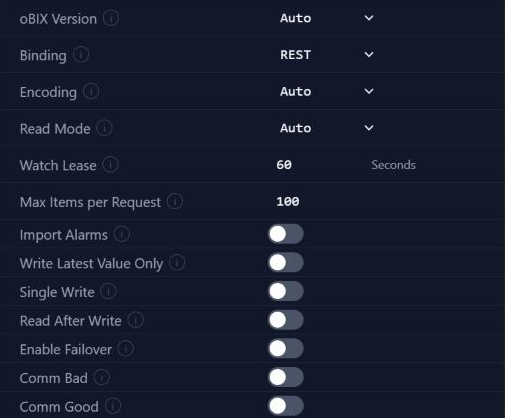
| oBIX Version | Auto | The oBIX version the server speaks. Auto reads the version from the Lobby. V1_1 is oBIX 1.1. V1_0 is oBIX 1.0; the driver then uses XML over REST only. |
| Binding | REST | The transport used to talk to the server. REST sends HTTP requests. WebSocket keeps one WebSocket connection, and falls back to REST when the server does not list the binding. Hidden when oBIX Version is V1_0. |
| Encoding | Auto | The encoding of requests and replies: Auto, XML or JSON. Auto uses JSON when the Lobby lists it, otherwise XML. Hidden when oBIX Version is V1_0. |
| Read Mode | Auto | How values are read from the server. See Read modes. |
| Watch Lease | 60 Seconds | The lease of the driver's watch on the server. The server deletes a watch that is not polled within its lease, so the driver raises the lease above the slowest polling rate plus the Timeout. Hidden when Read Mode is Batch or Get. |
| Max Items per Request | 100 | The most points added to a watch, or read or written in a batch, in one request. |
Read modes
| Read Mode | What the driver does |
|---|---|
| Auto | A watch when the server supports watches, otherwise a Lobby batch, otherwise one request per point. |
| Watch | The server reports changes to a watch that the driver polls. The driver keeps one watch for each polling rate, and makes a watch again if the server has lost it. Over WebSocket, the server pushes the changes instead. |
| Batch | Each poll reads the points in Lobby batch requests. |
| Get | Each poll reads each point with its own request. |
Writes
These options control how writes queue on their way to the server. How each write reaches its object is set on the tag, by Write Method.
| Property | Default | Notes |
|---|---|---|
| Write Latest Value Only | off | Only the last value in the pending queue of writes is written. Useful on slow networks or with a slow server. |
| Single Write | off | On: each value is written one at a time. Off: the values are written together. |
| Read After Write | off | Read the point back after each write. |
Alarms
| Property | Default | Notes |
|---|---|---|
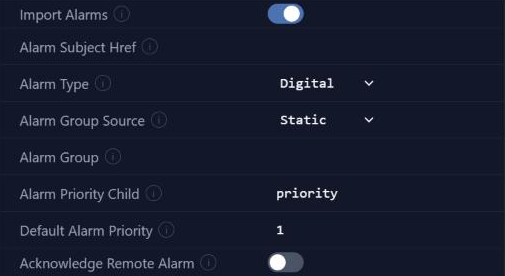
| Import Alarms | off | Merge the server's alarms into the OAS real-time alarms. The fields below are shown when it is on. |
| Alarm Subject Href | blank | The href of the server's alarm subject whose alarms are merged. Leave blank to use the first one found. |
| Alarm Type | Digital | The OAS alarm type given to merged alarms. |
| Alarm Group Source | Static | Where a merged alarm's group comes from. Static: the Alarm Group name. Source: the path of the alarm source's parent. Child: a child of the alarm record, named in Alarm Group Child. |
| Alarm Group | blank | Shown when Alarm Group Source is Static. The group of merged alarms. Leave blank to use the driver interface name. |
| Alarm Group Child | blank | Shown when Alarm Group Source is Child. The child of the alarm record used as the group, for example the alarm class. |
| Alarm Priority Child | priority | The child of the alarm record used as the priority. |
| Default Alarm Priority | 1 | The priority of a merged alarm whose record has no priority child. |
| Acknowledge Remote Alarm | off | On: acknowledging a merged alarm in OAS also acknowledges it on the server. Off: OAS acknowledgements are local only. Acknowledgements made on the server still reach OAS. |
The Alarm sources tab of One Click Import lists the sources the driver has seen alarms from, and makes each one a tag whose Field is AlarmRecord.
Failover
| Property | Default | Notes |
|---|---|---|
| Enable Failover | off | Enable failover to a second server when the primary fails. |
| Failover Lobby URL | blank | The URL of the failover server's Lobby, used while the primary is offline. |
| Failover User Name | blank | The user name for the failover server. |
| Failover Password | blank | The password for the failover server. |
Communication status
Each of these sets a Boolean tag from the state of the driver interface. Turning one on shows the field that names the tag.
| Property | Default | Notes |
|---|---|---|
| Comm Bad | off | Set a tag to true while the driver interface is enabled and in communication failure. |
| Comm Good | off | Set a tag to true while the driver interface is enabled and communications are good. |
Tag properties
A tag reads an oBIX object through its own properties on the Tags screen, not through the driver.
| Property | Default | Notes |
|---|---|---|
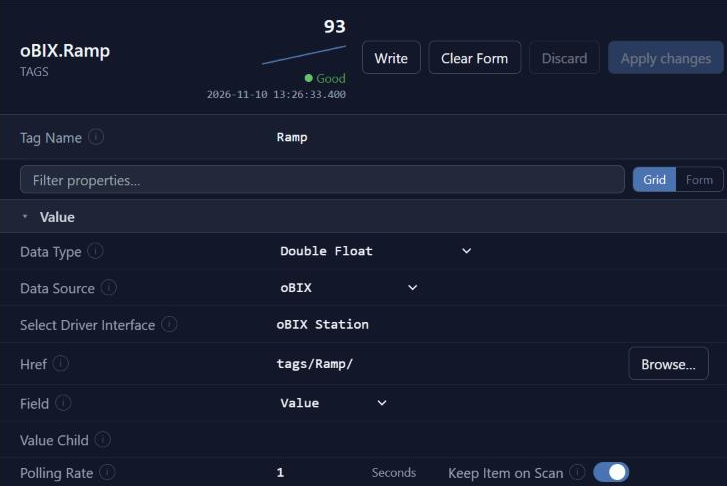
| Data Source | - | Set to oBIX. |
| Select Driver Interface | - | The oBIX driver interface the tag reads through. |
| Href | blank | The href of the oBIX object to read, relative to the Lobby, for example points/AHU1/SupplyTemp/. Browse... opens Browse for oBIX object, where Use this object sets it. |
| Field | Value | What the tag reads from the object. See Fields. |
| Value Child | out | The child that holds the value when the object is not itself a value, as on Niagara points. Blank reads the object itself. |
| Write Method | Auto | How a write reaches the object. See Write methods. Hidden when Read Only is on. |
| Write Operation | set | Shown when Write Method is Operation. The operation a write invokes, for example set, override or emergencyOverride. |
| Override Duration | 0 Seconds | Shown when Write Method is Operation. How long an override written by the operation lasts. It is sent only when the operation takes a duration, as Niagara's override does. 0 sends no duration. |
| Polling Rate | 1 Seconds | How often the value is read. In a watch, the driver keeps one watch for each polling rate. |
Fields
| Field | What the tag reads |
|---|---|
| Value | The object's value. |
| Status | The object's status, for example ok, overridden, alarm or fault. |
| AlarmRecord | The alarm record as JSON, for a tag with the JSON data type. |
| Display | The object's display text. |
| Units | The object's unit. |
Write methods
| Write Method | What a write does |
|---|---|
| Auto | The object's writePoint operation when it is a writable point, otherwise a PUT of the value when the object is writable. |
| WritePoint | The object's writePoint operation. |
| PutValue | A PUT of the value. |
| Operation | The operation named in Write Operation, with Override Duration where it takes one. |
Troubleshooting
| Symptom | Cause |
|---|---|
| Test Connection fails at the sign-in | The User Name or Password is not a user on the server. On the OAS oBIX server, it must be an OAS user. See Connection. |
An https Lobby fails at the certificate | The server uses a self-signed or private CA certificate. Set Server Certificate File to the server's certificate, or to a CA it chains to. Allow Invalid Certificate gets past it, but only for testing. See Connection. |
| Reads time out on a large configuration | The Timeout is still the 1000 millisecond default. Set it to 5000 or more, or lower Max Items per Request. See Connection and oBIX settings. |
| A tag reads Bad on a connected driver | The Href does not name an object on the server, the Data Type does not fit the value, or the server reports the point as fault, down or disabled. Check the Href with Browse.... See Tag properties. |
| A tag reads an object rather than a value | The object holds its value in a child. Set Value Child, out on Niagara points. See Tag properties. |
| Writes are refused | The user has no write rights on the point. On the OAS oBIX server, Allow Writes must also be on under Options. See Write methods and Users and permissions. |
| WebSocket is set but the driver uses REST | The server does not list the WebSocket binding in its Lobby, or speaks oBIX 1.0. See oBIX settings. |
Troubleshoot in the app covers oBIX as well. For a driver that will not connect it runs Test Connection with the saved settings and stops at the first check that failed. To capture the traffic for support, turn on Log oBIX Communications in the System Logging section of the Options screen.
Where next
- Getting Started with oBIX - these options in a working configuration.
- oBIX Server - serving OAS tags, alarms and histories to oBIX clients.