
Snowflake Driver
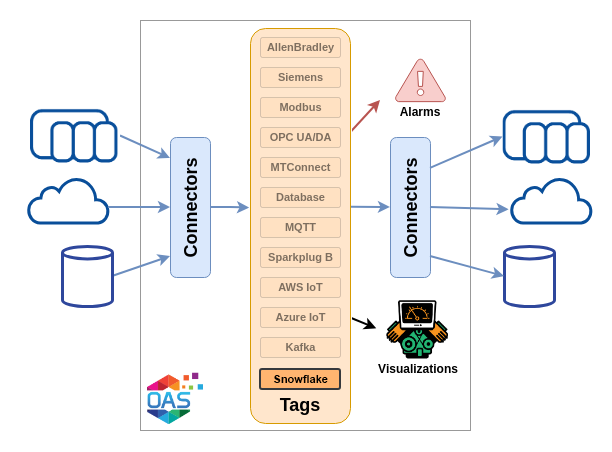
The Snowflake driver streams OAS tag data directly into a Snowflake table using the Snowpipe Streaming REST API v2. There are no staging files, no COPY INTO job and no warehouse running for ingestion. Rows are appended over HTTPS and are queryable within seconds of leaving the engine.
| Property | Description |
|---|---|
| Direction | Write only. The driver never reads from Snowflake into a tag. |
| Transport | HTTPS, Snowpipe Streaming REST API v2 |
| Authentication | Key pair (RSA / JWT) or Programmatic Access Token |
| Delivery | Exactly once per channel, resumed across restarts |
| Buffering | Store and Forward, oldest first |
| Licensing | Requires the Snowflake licensed option |
Getting Started
Prepare the account - the user, role, table and grants - then set up the key pair or token.
Config Reference
Every parameter on the Snowflake driver, with its default and what it does.
How-To Guides
Step-by-step guides for streaming any OAS data source into a Snowflake table.
Requirements
- An OAS installation licensed for the Snowflake option
- A Snowflake account with Snowpipe Streaming available
- A Snowflake user, role and target table, created by a Snowflake administrator
- Outbound HTTPS from the OAS engine to your Snowflake account host and streaming host
Warning
An unlicensed driver raises a latching License system error and is refused before its configuration is even examined:
"Snowflake driver: not licensed on this system. Contact your OAS representative to add the Snowflake option."
Check the license first when a driver never connects and Snowflake shows no activity at all.
How it works
Every row the driver sends carries an offset. Snowflake remembers the last offset it committed for the channel, and on reconnect the driver asks where it got to and resumes from there. A driver disable, an engine restart or a machine reboot therefore neither loses rows nor repeats them.
The channel carries that memory, so the driver does not delete its channel when it stops. It drops one only when the channel names something it will never write to again - a change of account, credential, table, pipe or channel name - which is also the only way an offset sequence restarts at zero. See Delivery guarantees for the SQL that proves it.
The table is the contract
Because Snowflake rows are columns rather than documents, this driver has no message format to design. The table is the contract. A Column Mapping names each column, its Snowflake type and which tag property fills it, and the mapping editor generates the matching CREATE TABLE statement for you.
The mapping is also ISA-95 aware: any column can be filled from the tag's position in an equipment hierarchy, such as Enterprise, Site, Area, Work Center, Work Unit, all resolved by walking the groups enclosing the tag. An ISA-95 Lite preset lays out a unified namespace table in one click.
OAS does not browse or create objects in your account, and it never alters or drops an existing table. Point the driver at a table that is already there and make the mapping match its columns, or let the driver create the table from the mapping on connect.
Authentication
The driver authenticates as a Snowflake user, either with a key pair it signs its own assertion with, or with a Programmatic Access Token. Key-pair authentication does not expire and needs no network policy, which is why it is the default and the right choice for anything unattended. A token is quicker to set up and expires on a date you have to record. Both are covered under Authentication.
Store and Forward
Rows that cannot be sent are written to disk and replayed when the connection returns, oldest first, always. Last In First Out is deliberately not offered here: Snowpipe Streaming is an ordered protocol, so replaying the newest file first would land recent rows ahead of older ones under offsets that say the opposite. See Store and Forward.
Knowing the rows landed
An append returning success means Snowflake accepted the batch, not that it kept it. Rows are validated asynchronously against the table, so a wrong column mapping streams happily and writes nothing at all.
Two mechanisms close that hole. Preflight compares the mapped column names against the table's real columns on every connect, and catches the column name that Snowflake discards in silence. Validation polls the channel and reports the rows Snowflake actually rejected, optionally into tags you can alarm on.
Limits and caveats
- Write only. The driver never reads from Snowflake into a tag.
- Flat rows. Snowflake columns are flat and there is no nested output. Use a VARIANT column if you need structure inside one field.
- No second target. An outage is ridden out by Store and Forward, not by streaming to a different table.
- No account browsing. Database, Schema and Table are text fields, by design.
- No role selection. The driver uses the user's default role.
Each of these, and the rest, is explained under Limits and caveats.
Related How-To guides
- Getting Started - preparing the Snowflake account and the credential.
- Snowflake How-To Guides - every guide that streams data into Snowflake.
- Data Transfer guides - move data between IoT platforms and devices.
- IoT Connectors - the rest of the cloud, broker and streaming connectors.