
Kafka Config Reference
Below is a comprehensive list of each configuration option on the Kafka driver with its default, a description of its purpose and what effect it will have.
The driver options are set on the Drivers screen. The options a tag uses to consume from Kafka are set per tag on the Tags screen, and are listed under Consumer tag properties.
Minimum configuration requirements
These are the fields that need a value before the driver will do anything. Everything else has a working default.
| Field | Needed for | Notes |
|---|---|---|
| Driver Interface Name | Both | The name tags refer to in Select Driver Interface. |
| Driver | Both | Set to Kafka. |
| Bootstrap Servers | Both | Defaults to localhost:9092, which is a real address - the driver will try it. |
| Enable | Both | The interface is not active until this is on and the changes are applied. |
| Publish Selected Tags | Producer | Off by default. A driver interface with this off is a consumer only. |
| Tags To Publish | Producer | Nothing is published until tags are added. |
| Topic | Consumer | Set on the tag, not on the driver. |
Driver interface
| Property | Default | Notes |
|---|---|---|
| Driver Interface Name | - | The name used to identify this driver interface. Tags reference it from their Select Driver Interface property. |
| Driver | Modbus | Set to Kafka to produce and consume with Apache Kafka clusters. |
| Enable | on | Enable communications. Hidden when Enable by Tag is on. |
| Enable by Tag | off | Enable and disable the driver from a Boolean tag instead, named in the field beside it. |
| Good Quality When Disabled | off | On: tags on this driver keep good quality while the driver is disabled, and can be written to. Off: they go to bad quality. |
| Simulate | off | Disable communications and hold every value static with good quality. |
| Return to Online | 60 Seconds | How often to re-check communications after the interface has been taken offline. |
Connection
| Property | Default | Notes |
|---|---|---|
| Bootstrap Servers | localhost:9092 | Comma-delimited list of broker addresses as host:port. This is a seed list only - the addresses are used to fetch cluster metadata and the full broker set is then learned from the cluster, so listing more than one buys startup and reconnect resilience rather than load balancing. Every entry must be a broker of the same cluster; a disaster-recovery cluster belongs in Failover Bootstrap Servers, not here. |
| Security Protocol | Plaintext | Plaintext, Ssl, SaslPlaintext or SaslSsl. Plaintext suits a cluster on the local network; a hosted cluster will want SSL or SASL. |
| SASL Mechanism | Plain | Gssapi, Plain, ScramSha256, ScramSha512 or OAuthBearer. Shown for the SASL protocols. |
| SASL Username | blank | Shown for Plain, ScramSha256 and ScramSha512. For Confluent Cloud this is the API key. |
| SASL Password | blank | As above. For Confluent Cloud this is the secret. |
TLS certificates
Shown when the Security Protocol is Ssl or SaslSsl. Each certificate can be given as a file path or pasted as PEM text - use one or the other, not both.
| Property | Default | Notes |
|---|---|---|
| SSL CA Location | blank | Path to the CA certificate file. |
| SSL CA Pem | blank | The CA certificate as PEM text. |
| SSL Certificate Location | blank | Path to the client certificate file. |
| SSL Certificate Pem | blank | The client certificate as PEM text. |
| SSL Key Location | blank | Path to the client private key file. |
| SSL Key Pem | blank | The client private key as PEM text. |
| SSL Key Password | blank | Passphrase for an encrypted private key. |
| SSL Keystore Location | blank | Path to a PKCS#12 keystore, as an alternative to the separate certificate and key. |
| SSL Keystore Password | blank | Password for the keystore. |
Producer tuning
These tune throughput against latency on the producer side. Each has a working default, and the defaults suit most clusters.
| Property | Default | Notes |
|---|---|---|
| Acks | Leader | None, Leader or All. How many brokers must acknowledge a write before it counts as delivered. All is the durable choice; None is the fastest and can lose messages. |
| Client Id | oas-kafka | The identifier the driver sends with its requests, and what the broker logs it as. |
| Compression Type | None | None, Gzip, Snappy, Lz4 or Zstd. |
| Batch Num Messages | 10000 | Maximum number of messages in one producer batch. |
| Batch Size | 1000000 | Maximum size in bytes of one producer batch. |
| Linger | 5 ms | How long to wait for more messages before sending a batch. Higher gives larger, better-compressed batches at the cost of latency. |
| Max In Flight | 1000000 | Requests allowed in flight per broker connection before the producer blocks. |
| Message Max Bytes | 1000000 | Maximum size of a single message. Must not exceed the broker's own limit. |
| Message Timeout | 300000 ms | How long the producer keeps trying to deliver a message before it fails. |
| Queue Buffering Max Kbytes | 1048576 | Maximum total size of the producer's send queue. |
| Queue Buffering Max Messages | 100000 | Maximum number of messages in the producer's send queue. |
| Request Timeout | 30000 ms | How long to wait for a broker to answer a produce request. |
| Socket Connection Timeout | 30000 ms | How long to wait for a broker socket to be set up. |
| Socket Keepalive Enable | off | Enable TCP keep-alives on broker sockets. |
| Socket Timeout | 60000 ms | How long a broker socket may stall before it is treated as failed. |
| Transaction Timeout | 60000 ms | How long a transaction may remain open. |
Topic creation
| Property | Default | Notes |
|---|---|---|
| Automatically Create Topics | on | Before a topic is written to for the first time, create it if it does not exist already. |
| Replication Factor | -1 | Used when a topic is created. -1 leaves it to the broker's default. Shown when Automatically Create Topics is on. |
| Number Partitions | -1 | Used when a topic is created. -1 leaves it to the broker's default. Shown when Automatically Create Topics is on. |
Message format New
| Property | Default | Notes |
|---|---|---|
| Output Format | Default | Default - JSON, with field names taken from the payload field names. ISA-95 Lite - the built-in unified namespace schema. Custom AVRO Schema - your own schema. |
| Batched Messages | on | Default format only. On: every tag value goes into one message. Off: each tag value is published as its own message, still using the same structure. |
| AVRO Schema | blank | The AVRO schema the message is published against, written or loaded in the Edit AVRO schema dialog - see Schema mapping. Shown when the Output Format is Custom AVRO Schema. |
| AVRO Schema Field Map | blank | Which part of a tag fills each field in the schema. Built on the Field Mapping tab of the same dialog - see Schema mapping. Shown when the Output Format is Custom AVRO Schema. |
| Force AVRO Binary New | off | Publish AVRO binary using the Avro single-object encoding, which carries a fingerprint of the schema in place of a Schema Registry ID. The consumer needs a copy of the same schema, so download the .avsc from the Output Format field and give it to the consumer - that is what keeps the two ends in step. When this is off, messages are published as JSON. There is no JSON fallback while this is on: a value that cannot be encoded is discarded and logged. Shown when the Schema Registry is off - with the registry on the wire format is already AVRO binary and the schema ID comes from the registry. |
ISA-95 Lite
ISA-95 Lite publishes a fixed record aligned with the ISA-95 Part 2 equipment hierarchy model, for a unified namespace. It is not an official ISA or MESA publication.
| Field | Filled from |
|---|---|
equipmentHierarchy.enterprise .site .siteId .area | The ISA-95 level assigned to the tag groups that enclose the tag |
equipmentHierarchy.workCenter .workCenterType | Work Center tier - Process Cell, Production Unit, Production Line or Storage Zone |
equipmentHierarchy.workUnit .workUnitType .workUnitId | Work Unit tier - Unit, Work Cell or Storage Unit |
equipmentHierarchy.equipmentModule .equipmentModuleId .controlModule .controlModuleId | The lower two tiers |
groupPath | The tag's group path verbatim, as an array, at any depth |
tagName | The full tag path |
timestamp | The tag's own timestamp, as epoch milliseconds |
dataType | BOOLEAN, INT, LONG, FLOAT, DOUBLE or STRING |
value | The tag value |
quality.isGood quality.severity | OAS quality, normalised to GOOD or BAD |
units sourceProtocol | The tag's Units and Data Source |
metadata | Additional key/value pairs |
Info
The hierarchy fields are resolved by walking the tag groups that enclose the tag and reading the ISA-95 level assigned to each group. A group with no level assigned contributes nothing, and a tag at the root of the configuration publishes null for the hierarchy fields. Where a group has an export name override, the override is published instead of the group's own name.
Schema mapping New
A custom AVRO schema has to be told which part of a tag fills each of its fields. Both the schema and that mapping are built in the Edit AVRO schema dialog, which has three tabs: Schema Editor, Field Mapping and Data Test. Nothing is written back to the driver until you click OK.
Schema Editor
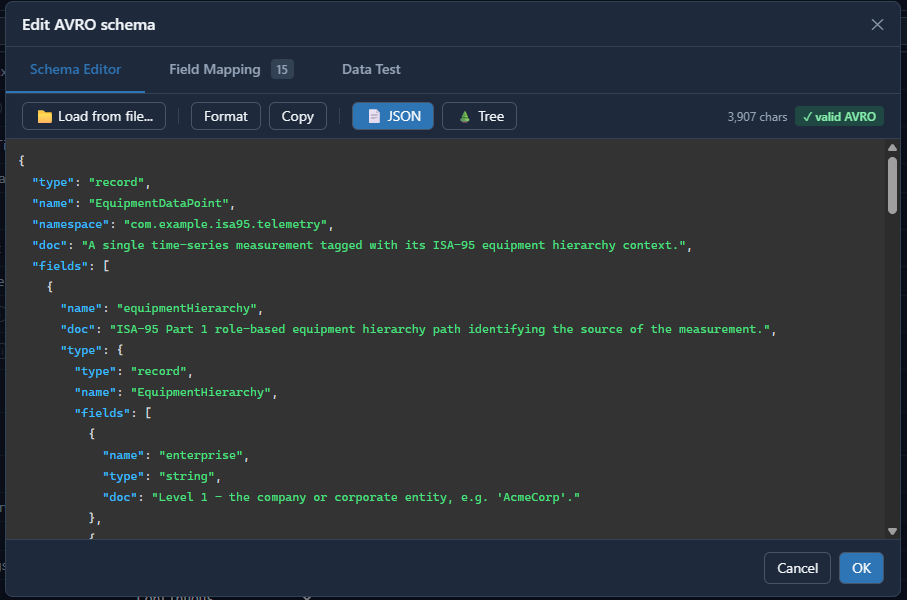
Where the schema itself is written. Load from file… brings in an existing .avsc, or you can paste it in and click Format to tidy it; Copy takes it back out. JSON and Tree switch between the raw schema and a structural view of it. Alongside them the header shows the schema's size and whether it is valid AVRO - the Field Mapping tab is built from the fields it finds, so this is where a malformed schema shows up first.
Field Mapping
Every field in the schema, in schema order, with nested records indented under their parent and the field count shown on the tab. The schema's own doc text is shown beside each field, which makes a well-documented schema much easier to map.
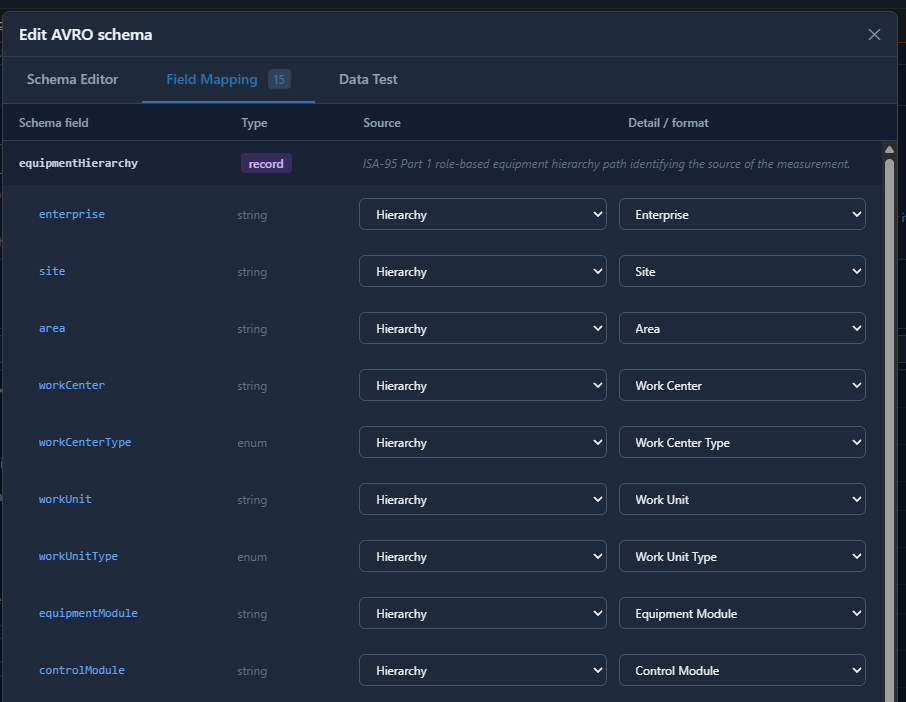
| Column | What it holds |
|---|---|
| Schema field | The field name, taken from the schema |
| Type | The AVRO type, taken from the schema - a nested record is marked record and holds no value of its own |
| Source | What fills the field |
| Detail / format | Qualifies the source - which ISA-95 level, which tag property, how to render it |
Sources:
| Source | Fills the field with |
|---|---|
| Tag Property | Value, Timestamp, Tag Name, Tag Path, Group Path, Quality, Quality Severity, Tag ID, Data Type, or any named custom tag property |
| Hierarchy | An ISA-95 level, resolved from the groups enclosing the tag |
| Constant | A fixed value |
| System Timestamp | The engine clock at message build. Publishing both this and the tag timestamp makes latency measurable, as the difference between the two. |
| UUID | A fresh identifier per record, so two records for the same tag in the same millisecond stay distinguishable |
| Null / Ignore | The field is left null |
The ISA-95 levels available under Detail / format are Enterprise, Site, Site ID, Area, Work Center, Work Center Type, Work Unit, Work Unit Type, Work Unit ID, Equipment Module, Equipment Module ID, Control Module and Control Module ID, along with the tag's group path. A level with no matching group resolves to null, and a field left unmapped is published as null rather than omitted.
For a value or a timestamp, Detail / format is how it is rendered instead. Timestamp fields take ISO 8601, Unix seconds, Unix milliseconds, ticks, or a custom .NET format string. Value fields take as-is, force to string, parse as numeric, round to integer, true/false, 0/1, or a custom pair of boolean words.
Info
Tag Name returns the last two components of the tag path. On a two-level tag it is identical to Tag Path. Where a field has to identify the tag uniquely, map Tag Path.
Data Test
Pick a tag from the browser on the left and the tab renders the message that tag would produce right now, beside its current value, quality and timestamp, with Refresh to take a fresh reading. It is a preview built from live tag data - nothing is published to the cluster by it.
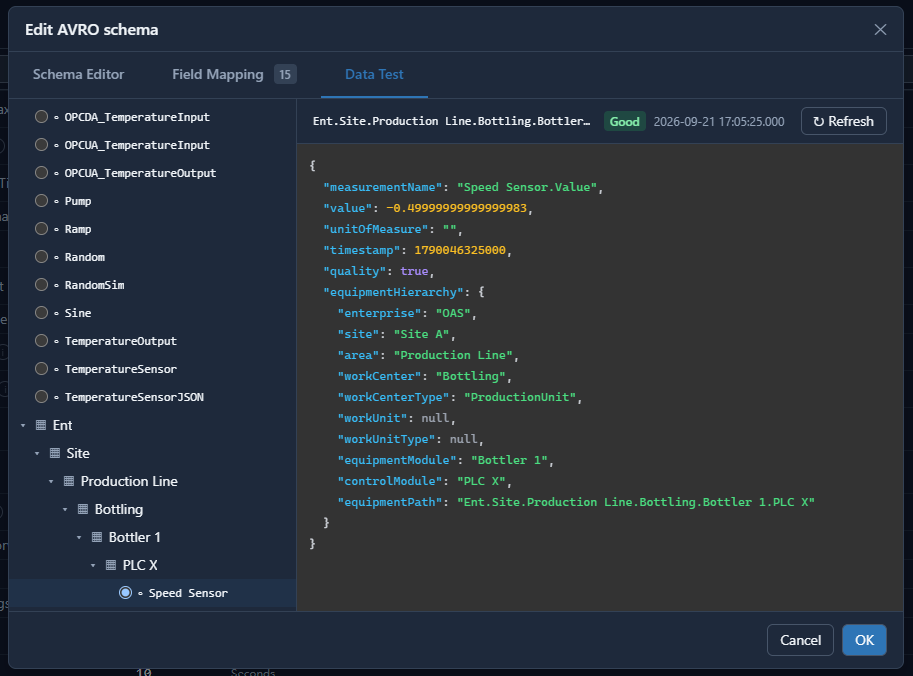
This is the quickest way to catch a mapping that is syntactically fine but wrong: a hierarchy level that resolves to null because the tag is not under a group carrying that level, a timestamp in the wrong units, or a boolean that reaches the consumer as a string.
Schema Registry New
| Property | Default | Notes |
|---|---|---|
| Enable Schema Registry | off | Connect to a Confluent Schema Registry for AVRO schema management. |
| Schema Registry URL | blank | For example http://localhost:8081. |
| Schema Registry Username | blank | If the registry requires authentication. |
| Schema Registry API Key | blank | Entered as a password. |
| Schema Subject Name | blank | The subject to register or retrieve schemas under. Leave blank to register under <topic name>-value. |
Warning
With the Schema Registry enabled and the Default output format, the message uses the schema's fixed field names - values, id, value, quality, timestamp - and always includes quality and timestamp. The payload field names below do not apply, and neither do multiple pipe-separated tag identifiers.
Publishing
Publishing is off until Publish Selected Tags is turned on. A driver interface with it off is a consumer only.
| Property | Default | Notes |
|---|---|---|
| Publish Selected Tags | off | Turns publishing on for this driver interface. |
| Tags To Publish | - | The tags to publish, each with the Id that names it in the message. The Id is also the topic when Publish All Tags As One Topic is off. Use a vertical bar to separate multiple identifiers, for example id1|id2|id3. |
| Publish Type | Continuous | Continuous on an interval, Event Driven from a trigger tag, or Specific Time of Day. |
| Publish Interval | 10 Seconds | Continuous only. |
| Publish On Startup | on | Continuous only. Publish immediately on startup rather than waiting out the first interval. |
| Trigger Tag | - | Event Driven only. A Boolean tag triggers on transition; an Integer tag triggers whenever its value changes to a non-zero value. |
| Digital Trigger Type | False to True | Event Driven only. False to True, True to False or Both. |
| Time of Day | - | Specific Time of Day only. |
| Publish Latest Value Only | on | On: publish only the current value of each tag. Off: publish every value change since the last publish. Turn this off when the target is a historian. |
| Publish Boolean As Number | off | Publish 1 and 0 rather than true and false. |
| Include All Tags Each Publish | off | Include every selected tag in each publish, even the ones that have not changed. |
| Include Tags For Period | off | Include all tag values in each publish for the period set beside it, then drop the unchanged ones from further publishing. The period defaults to 1 second. |
| Publish All Tags As One Topic | on | On: all values go to Publish Topic Id. Off: each tag goes to its own topic, named by its Id in Tags To Publish. |
| Publish Topic Id | oas_tags | The topic used when Publish All Tags As One Topic is on. |
| Override Value When Bad | None | What to publish when a tag's quality is bad: None (publish it bad), Do Not Send, Hold Last Value, Set To Value or Hold Then Set. |
| Override Time | 60 Seconds | How long to hold the last good value. Shown for Hold Last Value and Hold Then Set. |
| Value When Bad | 0 | The value to publish instead. Shown for Set To Value and Hold Then Set. |
Payload field names
These name the fields inside a Default format message. They do not apply to ISA-95 Lite or Custom AVRO Schema, where the schema names the fields, and they do not apply when the Schema Registry is enabled.
| Property | Default | Notes |
|---|---|---|
| Values Id | values | The name of the array that holds the values. |
| Publish Tag Id | id | The field carrying each tag's identifier. |
| Publish Value Id | value | The field carrying the value. |
| Include Quality | on | Include the quality with each value. |
| Id (quality) | quality | The field carrying the quality. |
| Include Timestamp | on | Include the timestamp with each value. |
| Id (timestamp) | timestamp | The field carrying the timestamp. |
| Timestamp Type | ISO 8601 | ISO 8601, Unix, Unix ms, Ticks or Custom. |
| Format | yyyy-MM-dd HH:mm:ss.ffffff | Shown when the Timestamp Type is Custom. |
Store and Forward
| Property | Default | Notes |
|---|---|---|
| Enable Store and Forward | off | Buffer values when the cluster cannot be reached, rather than discarding them, and forward them once communication is restored. |
| Last In First Out | off | Process buffered data newest first. Shown when Store and Forward is on, and requires Store Buffer to Disk. |
Info
Where the buffer is kept is not a driver property. It is set once for the whole engine under Configure → Options → Store and Forward: Store Buffer to Disk, Directory for Buffer, Limit Disk Buffering and, for buffering data published from a remote engine, Buffer Data for Remote IoT Publish.
Failover
Shown when Enable Failover is on. These describe a second, independent cluster - not more brokers of the primary cluster, which belong in Bootstrap Servers.
| Property | Default | Notes |
|---|---|---|
| Enable Failover | off | Enable fail over to the backup connection when the primary interface fails. |
| Failover Bootstrap Servers | localhost:9092 | Comma-delimited broker addresses of the failover cluster. |
| Failover Security Protocol | Plaintext | As the primary, for the failover connection. |
| Failover SASL Mechanism | Plain | Shown for the SASL protocols. |
| Failover SASL Username | blank | Shown for Plain, ScramSha256 and ScramSha512. |
| Failover SASL Password | blank | As above. |
| Failover SSL CA Location | blank | Shown for Ssl and SaslSsl. |
| Failover SSL CA Pem | blank | As above. |
| Failover SSL Certificate Location | blank | As above. |
| Failover SSL Certificate Pem | blank | As above. |
| Failover SSL Key Location | blank | As above. |
| Failover SSL Key Pem | blank | As above. |
| Failover SSL Key Password | blank | As above. |
| Failover SSL Keystore Location | blank | As above. |
| Failover SSL Keystore Password | blank | As above. |
| Failover Schema Registry URL | blank | Shown when the Schema Registry is enabled. |
| Failover Schema Registry Username | blank | As above. |
| Failover Schema Registry API Key | blank | As above. |
Warning
The failover cluster needs its own Schema Registry. Schema IDs are issued by, and only mean anything within, the cluster that issued them, so the failover brokers cannot borrow the primary cluster's registry.
Consumer tag properties
A tag consumes from Kafka through its own properties on the Tags screen, not through the driver.
| Property | Default | Notes |
|---|---|---|
| Data Type | - | String or JSON. A JSON tag parses the payload into its members; a String tag holds it as text. |
| Data Source | - | Set to Kafka. |
| Select Driver Interface | - | The Kafka driver interface the tag subscribes through. |
| Topic | blank | The Kafka topic that supplies this parameter's value. |
| Read Only | off | The value cannot be written to. |
| Write Only | off | The value is not read from the topic, but writes are allowed. |
Where next
- Getting Started with Kafka - these options in a working configuration.
- Kafka How-To guides - logging, transferring and routing Kafka data.