
MQTT Driver
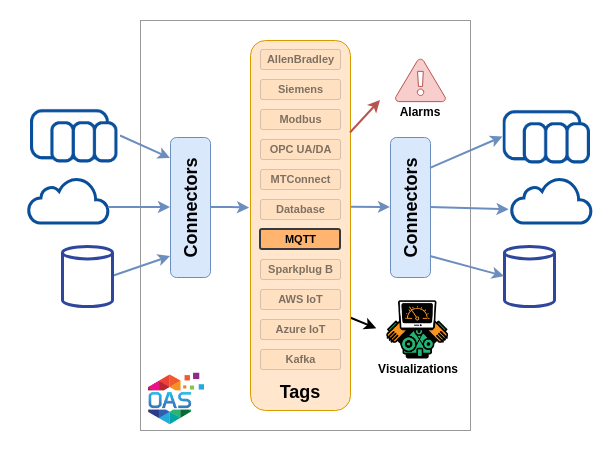
The OAS MQTT connector provides both an MQTT client and an MQTT broker. The client is the MQTT driver: a tag can subscribe to a topic on an external broker and take its value from the messages published there, and the same driver can publish selected tags to that broker on an interval, on a trigger, or at a time of day. The broker is built into the OAS engine, so any local or remote MQTT client can subscribe to it and receive tag data updates in real time.
| Property | Description |
|---|---|
| Direction | Read and write. Tags subscribe to a topic through the driver; the driver publishes selected tags to a topic. |
| Transport | MQTT 3.1, 3.1.1 or 5.0 to a broker address and port |
| Security | User name and password, with optional TLS 1.2 or 1.3 and client certificates |
| Delivery | Quality of Service chosen per tag - at most once, at least once or exactly once |
| Buffering | Store and Forward, buffered to disk and forwarded when communication is restored |
| Failover | A second broker the driver moves to when the primary connection fails |
| Licensing | Requires the MQTT licensed option, on OAS 8.26 or later |
Getting Started
Connect to a public broker, read a topic into a tag, then publish tags back to it.
Config Reference
Every parameter on the MQTT driver and what it does.
Videos
The connector and broker introductions, and the client, broker, publishing and failover walkthroughs.
How-To Guides
Step-by-step guides for logging, transferring and routing MQTT data.
Subscribe to external broker topics
To subscribe to external broker topics you create an MQTT driver interface with the connection parameters the broker needs, then create tags whose Data Source is MQTT. Each tag selects the driver interface and names the Topic it subscribes to, and is updated whenever the broker publishes a new value to that topic.
The topic, its Quality of Service and its timeout are properties of the tag rather than of the driver. They are listed under Subscriber tag properties.
Publish to external broker topics
Publishing is the same driver with Publish Selected Tags turned on. The tags listed in Tags To Publish are published on a configurable interval, when a Boolean trigger tag changes, or at a set time of day.
Tags can be published together as one topic or each as its own topic, with the tag identifier, value, quality and timestamp each named by a field you choose, so the JSON payload is yours to shape. Each option is listed under Publishing.
Messages can also be published against a schema instead: ISA-95 Lite, a built-in record aligned with the ISA-95 equipment hierarchy for a unified namespace, or a Custom AVRO Schema of your own. The MQTT driver publishes both as JSON text. See Message format.
MQTT Broker
The broker is part of the same MQTT product feature and is installed with the OAS platform, giving you a broker for reading and writing tag data without running one separately.
Tag data is presented in topic names that use standard Tag Path notation. A tag called Temperature in a tag group called Site1 publishes its Value property as the topic Site1.Temperature.Value.
The broker is not configured on the driver screen. Its port numbers, SSL security, broker ID, retain behaviour and client authentication are set once for the whole engine on the Options screen, so they are not part of the Config Reference, which covers the client driver. The MQTT Broker page lists every broker option and shows how a client reads and writes tags through it, including how to receive a topic in the format of a message schema.
Connection
A connection is defined by the broker's address and port, with a user name and password where the broker requires them. TLS adds the certificate files the broker expects, and every connection carries a Client ID that must be unique on that broker.
Keep alive, reconnect, protocol version and message buffering are set on the same screen. Each parameter is listed under Connection in the Config Reference.
Store and Forward
When the driver cannot reach the broker, Store and Forward buffers values to a directory on disk rather than discarding them, and forwards them once communication is restored. See Store and Forward.
Failover
With failover enabled the driver is given a second broker - its own address and port, its own credentials and its own certificates - and moves to it when the primary broker fails. See Failover.
Videos
- MQTT Connector - three minutes on what the connector does and where it fits.
- MQTT Broker - three minutes on the broker built into the engine.
- MQTT Client - connecting to a third party broker to subscribe and publish.
- OAS MQTT Broker - connecting an MQTT client to the OAS broker, indexed by chapter.
- IoT Publish - publishing selected tags to a broker, indexed by chapter.
- Driver Failover - setting up a failover interface.
All six are on the Videos page.
Related How-To guides
- MQTT Videos - the introductions and the walkthroughs.
- MQTT How-To guides - every guide that reads from or writes to MQTT.
- IoT Connectors - the rest of the cloud, broker and streaming connectors.