
Getting Started with Snowflake
This page covers everything that happens before the driver will connect: the Snowflake objects the driver expects to find, and the credential it authenticates with. None of it is done in OAS - these are steps for a Snowflake administrator, in the Snowflake web interface or a worksheet.
Work through it once per account. When you reach the end you will have the values for every field listed under Minimum configuration requirements, and the Config Reference takes it from there.
Important
The names below are examples. Substitute your own.
Every SQL statement on this page uses the same set of example names, and none of them are required or special:
| Example name | What it is |
|---|---|
abcdefg-xy12345 | The account identifier - yours will be different, and using this one will fail |
OAS_SVC | The Snowflake user the driver authenticates as |
OAS_STREAM_ROLE | The role holding the grants. Not a driver field - the driver never sends a role, it uses the user's default role |
OAS_DB / OAS_DATA / OAS_TAG_VALUES | The database, schema and table the rows are written to |
Change them to match your account's naming before running anything, and keep them consistent across the statements. The grants have to name the same objects the driver is pointed at.
Preparing Snowflake
OAS does not browse or create objects in your account. These steps are performed in Snowflake, by a Snowflake administrator.
Account identifier
The account identifier is the whole subdomain of your Snowflake URL: everything before .snowflakecomputing.com.
https://abcdefg-xy12345.snowflakecomputing.com
        └─────────────┘
        the Account Identifier
In Snowsight, the Snowflake web interface, go to Admin → Accounts, open the ... menu on your account and choose Manage URLs.
Important
Do not use the LOCATOR column on the Accounts page. It looks like an identifier, it is right there on screen, and it does not work. Authentication fails with a bare 401 that explains nothing.
It is not a full URL either, and not an app.snowflake.com link.
User and role
Tips
Already have a service user and role for OAS? Skip to Target table.
Nothing here is specific to this driver. Any Snowflake user whose default role holds the grants below will work. Note the user name for the driver's User field and move on.
Manually create a Role and a User in Snowsight, or use the SQL below to generate them. The names OAS_STREAM_ROLE and OAS_SVC below are examples and used throughout this documentation. Substitute your own.
CREATE ROLE  IF NOT EXISTS OAS_STREAM_ROLE;
CREATE USER  IF NOT EXISTS OAS_SVC
    DEFAULT_ROLE = OAS_STREAM_ROLE
    MUST_CHANGE_PASSWORD = FALSE;

GRANT ROLE OAS_STREAM_ROLE TO USER OAS_SVC;
ALTER USER OAS_SVC SET TYPE = SERVICE;
Info
The driver never sends a role. The role that applies is the user's default role, which is why it is set above. There is no Role field on the driver.
TYPE = SERVICE marks the account as a machine identity. It cannot log in interactively and is not prompted to change a password.
Target table
The Snowflake Driver needs a target database, schema, and table for writing data. In the OAS Configuration, you will be mapping data values to Snowflake table columns. As a convenience feature, the OAS Configuration Application will provide the SQL statement to create the table within the configured database and schema based on the specified columns and data types.
In the example below, the most basic OAS Tag properties are mapped to table columns, and the tool provides convenient presets for filling in column mappings, including a preset for ISA-95 style Equipment Hierarchy fields.
Additionally, there are Snowflake Metadata Columns you can map that assist with tracking data through Snowpipe. These are highly recommended, and they use specific Column Names that cannot be altered.
OAS Configuration Application - Column Mapping Interface 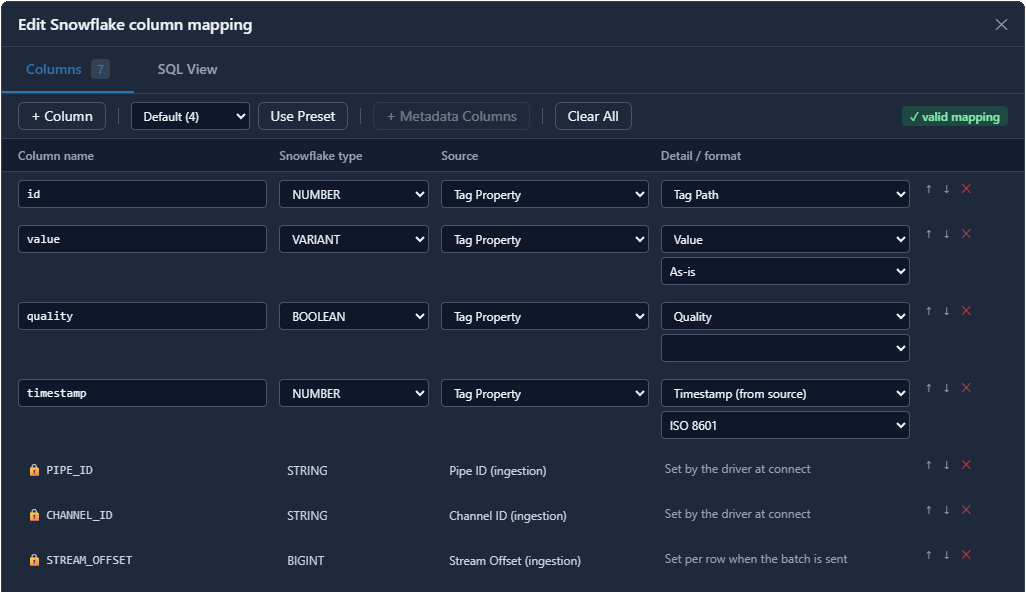
OAS Configuration Application - Generated Table Creation SQL 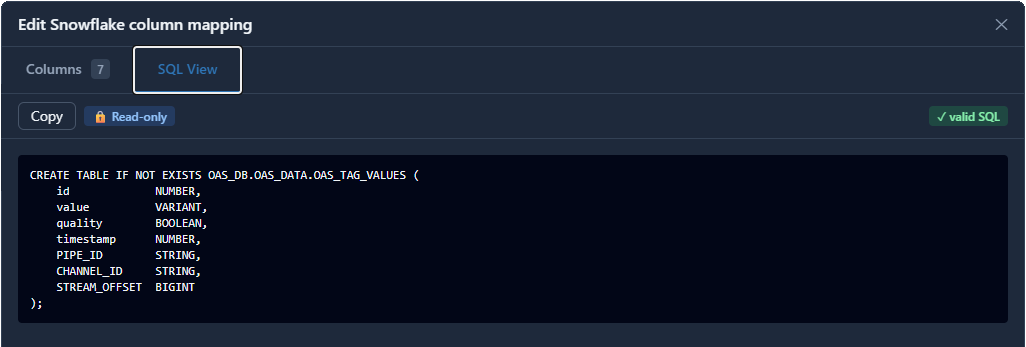
If the table already exists in SNOWFLAKE, leave it alone and point the driver at it, then make the Column Mapping match its columns rather than the other way round. OAS never alters or drops an existing table.
Grants
Specific minimum privileges are required for the connected user account to write data into Snowflake from OAS. These are USAGE on the DB and schema, and INSERT on the table. The following is how you can apply these in SQL.
GRANT USAGE  ON DATABASE OAS_DB                         TO ROLE OAS_STREAM_ROLE;
GRANT USAGE  ON SCHEMA   OAS_DB.OAS_DATA                TO ROLE OAS_STREAM_ROLE;
GRANT INSERT ON TABLE    OAS_DB.OAS_DATA.OAS_TAG_VALUES TO ROLE OAS_STREAM_ROLE;
Info
Those three grants are the entire permission surface for streaming. No warehouse, no CREATE PIPE, no OPERATE, and the driver never issues DROP or ALTER.
Two optional grants add optional features: a metadata read privilege lets the driver check the mapping against the real columns on connect (preflight), and CREATE TABLE on the schema lets it create the table for you. Both are safe to omit.
The pipe
Snowflake creates a default pipe for every table, named <TABLE>-STREAMING, when the channel is first opened. Leave the driver's Pipe field blank to use it. Set a name only where a custom pipe performs in-flight transformation. A custom pipe needs MATCH_BY_COLUMN_NAME = CASE_SENSITIVE and GRANT OPERATE ON PIPE to the role.
Authentication
The two options for authentication between OAS and Snowflake are Key Pair (JWT) and Programmatic Access Token (PAT). The following describes the various features and limitations of each type. It is highly recommended to use a Key Pair in a production environment as there is no expiration. This will reduce the chances of the driver failing unexpectedly.
| Key Pair JWT (default) | Programmatic Access Token | |
|---|---|---|
| Lifetime | Unlimited | 1–365 days, default 15 |
| Renewal | None - the driver signs its own assertion every 55 minutes, with no network call | A person must generate and paste a new token |
| Network policy | Not required | Mandatory for service users |
| Snowsight support | None; SQL only | Full |
| Right for | Production and anything unattended | Getting started quickly |
Key pair
If you do not already have a key pair, use Generate Key… beside Private Key Path in the driver. It writes to the Private Key PEM field or to a file on the engine machine - the Browse… button browses the engine machine, not your workstation - with an optional passphrase that is filled in for you.

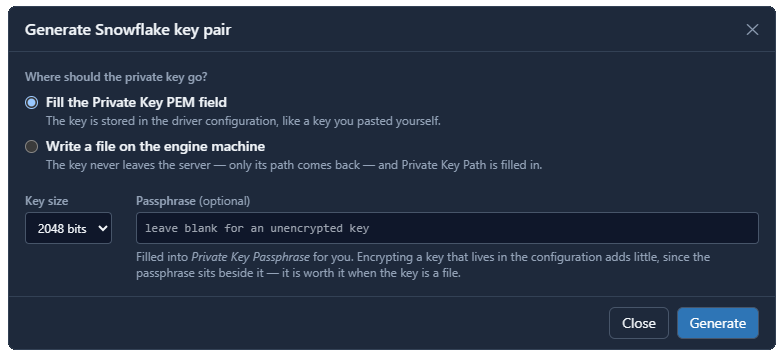
The dialog then produces two things:
- The
ALTER USERstatement with the public key already in it, BEGIN/END markers stripped. It is shown once. Copy it before closing the dialog. - The key's fingerprint, for comparing against Snowflake.
Important
OAS does not register the key for you. Run the ALTER USER statement in a Snowsight worksheet as ACCOUNTADMIN. Until you do, authentication fails.
To generate a key pair yourself instead:
# unencrypted
openssl genrsa 2048 | openssl pkcs8 -topk8 -inform PEM -outform PEM -nocrypt -out rsa_key.p8

# encrypted
openssl genrsa 2048 | openssl pkcs8 -topk8 -inform PEM -outform PEM -v2 aes-256-cbc -out rsa_key.p8
Tips
On Windows, OpenSSL ships with Git for Windows at C:\Program Files\Git\usr\bin\openssl.exe.
Register the public key as one line with the markers removed:
ALTER USER OAS_SVC SET RSA_PUBLIC_KEY='MIIBIjANBgkq…IDAQAB';
Key rotation uses RSA_PUBLIC_KEY_2 and does not interrupt streaming.
Supported key formats
| First line of the file | Supported |
|---|---|
-----BEGIN PRIVATE KEY----- | Yes |
-----BEGIN ENCRYPTED PRIVATE KEY----- | Yes, with the passphrase |
-----BEGIN RSA PRIVATE KEY----- | Yes |
-----BEGIN RSA PRIVATE KEY----- followed by Proc-Type: 4,ENCRYPTED and DEK-Info: | No |
The last form is what openssl genrsa -aes256 produces, and .NET cannot read traditional OpenSSL encryption. Convert it:
openssl pkcs8 -topk8 -in rsa_key.pem -out rsa_key.p8
The fingerprint does not change, so the key does not need re-registering.
Verifying the fingerprint
DESC USER OAS_SVC;
SELECT VALUE FROM TABLE(RESULT_SCAN(LAST_QUERY_ID())) WHERE PROPERTY = 'RSA_PUBLIC_KEY_FP';
The value must match the fingerprint shown by the Generate Key dialog, character for character. Identifiers in these statements must be unquoted.
Info
This check is worth the thirty seconds. Snowflake answers a mismatched key with a bare 401 naming neither keys nor accounts nor claims, so confirming the fingerprint permanently rules out the key as a cause of any later failure.
Programmatic access token
In Snowsight, open the user under Admin → Users & Roles → Users, find Programmatic access tokens and choose Generate new token. The secret is displayed once and cannot be retrieved - copy it immediately.
A service user additionally needs a network policy, or an authentication policy carrying PAT_POLICY = ( NETWORK_POLICY_EVALUATION = ENFORCED_NOT_REQUIRED ). Key-pair authentication has no such requirement.
The User field disappears when this option is selected, because the token identifies its own user.
Important
The token has an expiry date, and on that date the driver stops streaming and reports an authentication failure with nothing in the configuration having changed. Record the date.
Configure the driver
With the account prepared and the credential in hand, the driver itself is four screens' worth of fields:
- Connection - the Account Identifier and the credential you set up above.
- Target - the Database, Schema and Table you created. These are text fields; the driver does not browse the account.
- Column Mapping - the mapping that matches the table's columns, or the mapping the table was created from.
- Tags to Publish - the tags whose values become rows. Leaving this empty is a configuration error, not an idle driver.
Use Test Connection to confirm the account host, the credential and the streaming endpoint before going further. It does not touch your database, schema or table, so a pass there still leaves the table and the mapping to be proved - which is what Preflight and Validation are for.
Save the configuration
Apply changes updates the running configuration; it does not write it to disk. Click Save to write the driver configuration file, and set it as the default under Options so that it loads again when the service restarts.
Where next
- Config Reference - every parameter on the driver.
- Snowflake Driver - what the connector does and how it delivers.
- Snowflake How-To Guides - streaming each OAS data source into a table.