
oBIX Server New
OAS is both an oBIX client and an oBIX server. The server is built into the OAS engine and serves OAS tags, live alarms, alarm logs and data logs to any oBIX client, on ports of its own, so a building management system can read and write OAS tags without a separate gateway.
This page covers the server. The client driver, which connects OAS to an oBIX server such as a Niagara station, is covered in Getting Started and the Config Reference.
Info
The server needs OAS 22.2.0.3 or later and a licence that includes oBIX. Open Configure OAS and check that oBIX appears in the licensed drivers list.
Set up the server
The server is not set on the Drivers screen. Its options belong to the engine as a whole.
Select Options in the sidebar and open the oBIX Server section.
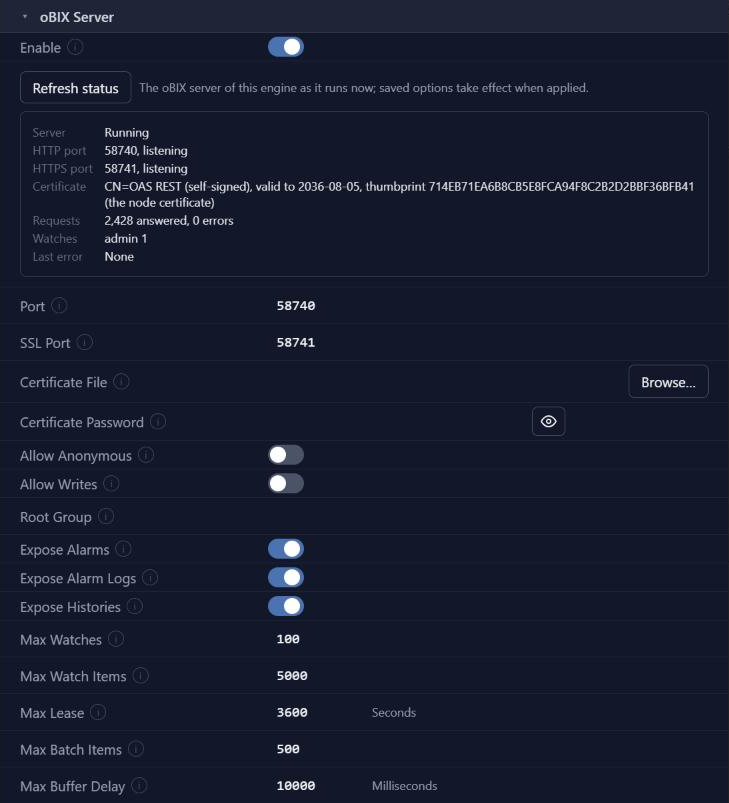
Turn on Enable.
Set Port, the HTTP port clients connect to. The default is 58740. Set it to 0 to turn HTTP off.
Set SSL Port, the HTTPS port. The default is 58741. Set it to 0 to turn HTTPS off. HTTPS uses the engine's node certificate unless you browse to a Certificate File and enter its Certificate Password.
The two ports must differ from each other and from every other engine port.
Leave Allow Anonymous and Allow Writes off unless clients need them. See Users and permissions.
Click on the Apply changes button. This saves the options immediately - there is no separate Save step on the Options screen.
Changing Enable, a port, the Certificate File or the Certificate Password restarts the oBIX server by itself when you apply. The other options apply at once.
Click Refresh status and check that the status panel shows the server running and each port listening.
The server is now ready for clients. A client connects to http://host:58740/obix/ for oBIX 1.1, or http://host:58740/obix10/ for oBIX 1.0, and signs in with an OAS user name and password. Use https and the SSL Port to keep the credentials and values encrypted.
Server options
Every option in the oBIX Server section of the Options screen.
| Property | Default | Notes |
|---|---|---|
| Enable | Off | Enables the OAS oBIX server, which serves tags, alarms and histories to oBIX clients. |
| Port | 58740 | The HTTP port of the server. 0 turns HTTP off. It must differ from the SSL Port and from every other engine port. |
| SSL Port | 58741 | The HTTPS port of the server. 0 turns HTTPS off. It must differ from the Port and from every other engine port. |
| Certificate File | (blank) | The certificate file for HTTPS. Blank uses the node certificate. |
| Certificate Password | (blank) | The password of the certificate file. |
| Allow Anonymous | Off | Serve requests without credentials, using the Default security group. |
| Allow Writes | Off | Let oBIX clients write tag values. A write also needs the write permission of the user's security group. |
| Root Group | (blank) | Serve only this tag group and the groups below it. Blank serves every tag. |
| Expose Alarms | On | Serve the live alarms. |
| Expose Alarm Logs | On | Serve the Alarm Logging databases. |
| Expose Histories | On | Serve the histories of data logged tags. |
| Max Watches | 100 | The most watches open at once, across all clients. |
| Max Watch Items | 5000 | The most items in one watch. |
| Max Lease | 3600 Seconds | The longest lease a client may set on a watch. A longer lease is cut to it. |
| Max Batch Items | 500 | The most requests in one batch. |
| Max Buffer Delay | 10000 Milliseconds | The longest buffer delay a client may set on a pushed watch. A longer delay is cut to it. |
To capture the server's requests and responses for support, turn on Log oBIX Server Communications in the System Logging section of the same screen. Credentials are never logged.
Server status
The status panel under Enable shows the oBIX server of this engine as it runs now: whether it is running, each port and whether it is listening, the certificate in use, the request and error counts, the open watches and the last error. Refresh status reads it again. Saved options take effect when they are applied.
What a client sees
The server answers oBIX 1.1 at /obix/ and oBIX 1.0 at /obix10/, with the same tree on both. It speaks XML on both versions and JSON on 1.1, over REST, with WebSocket on 1.1.
The Lobby lists:
| Lobby entry | What it holds |
|---|---|
about | The server, vendor and product. |
batch | Batch requests, up to Max Batch Items in one. |
watchService | Watches, polled by the client over REST or pushed to it over WebSocket. Watches hold points, alarm feeds and history feeds. |
tags | The OAS tag groups as objects and the tags as points. |
alarms | The live OAS alarms, with ack, as an alarm subject with count, query and feed. Left out when Expose Alarms is off. |
alarmLogs | Each Alarm Logging configuration whose history can be queried, as an alarm subject with count and query, up to 5,000 records a query. Left out when Expose Alarm Logs is off. |
histories | The OAS data logs as histories, with query, rollup, feed and CSV. Left out when Expose Histories is off. |
On oBIX 1.1 the Lobby also lists tagspaces, encodings, bindings and the ws endpoint.
Real, Boolean and String tags are served as points, and as writable points with a writePoint operation where the user may write. Enumerated tags are served as enum points with a range. Integer tags are served as plain int objects and array tags as plain list objects, since oBIX limits points to six kinds.
EXI, oBIX Binary, SOAP and CoAP are not supported.
Users and permissions
Clients sign in with HTTP Basic authentication, checked against the OAS users. Each user sees the tags their security group may browse and read.
- Writes are off for every user until Allow Writes is turned on, and then need the write permission of the user's security group.
- Anonymous access is off unless Allow Anonymous is turned on. Requests without credentials then use the Default security group.
- Root Group limits every user to one branch of the tags.
The OAS oBIX driver can read the server too. Getting Started uses it as the server, at http://localhost:58740/obix/.
Where next
- Getting Started with oBIX - the driver reading this server.
- Config Reference - every parameter on the driver.