What is the Goal of Siemens PLC data Historian?
A Siemens PLC historian records time-series data from controllers and stores it in a database for long-term analysis. With the OAS Platform, PLC data from one or more facilities can be logged into open databases such as SQL Server while maintaining reliable collection even when network connectivity is intermittent.
OAS Components Used
This example Use Case utilizes the following OAS Platform Components and can be deployed in many different configurations to achieve the best performance and reliability:
 OAS Universal Data Connector
Which Siemens Controllers Are Supported?
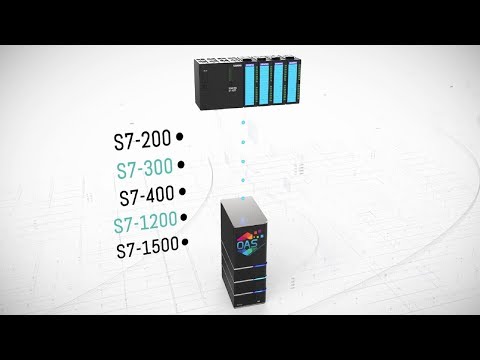
The OAS Siemens connector supports multiple generations of Siemens PLC hardware, allowing organizations to build a single historian architecture across both legacy and modern controllers.
- S7-200
- S7-300
- S7-400
- S7-1200
- S7-1500
Which Open Databases or Logging Targets Can Store Siemens Historian Data?
The OAS historian logs Siemens PLC data to a wide range of relational and cloud databases. This open database architecture allows PLC data to be accessed directly by reporting systems, business intelligence tools, and custom applications.
- Microsoft SQL Server
- Oracle
- Access
- mySQL
- SQL Azure
- PostgreSQL
- Cassandra
- MongoDB
- MariaDB
- SQLite
- CSV files
How is Siemens PLC Data Logged to Open Database
Siemens controllers can be connected directly to the OAS Universal Data Connector using the Siemens Connector. This achieves the fastest data transfer and supports native features of the controllers. Data points are then mapped to Tags within the OAS service and are then available to all components of the OAS Platform. Using the OAS Data Historian, Tag values are mapped to fields and tables within the target database. Logging can be configured in unlimited logging groups and unlimited targets, each set with different intervals and triggers.

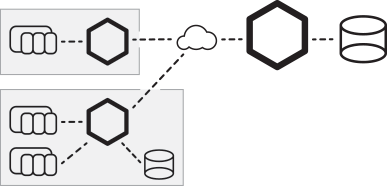
When deploying an enterprise logging solution with the OAS Platform where multiple physical locations are involved, you can also choose to deploy an instance of the OAS Universal Data Connector on each location’s network, ensuring all data points are capture, buffered, and logged even when network connections to the enterprise are down.
What Capabilities Does the Siemens PLC Data Historian Have?
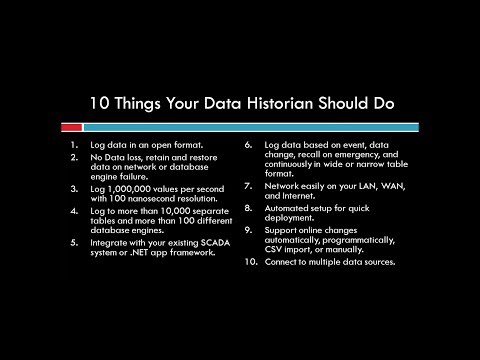
The OAS Data Historian provides flexible logging methods and high-performance data storage for industrial environments. It supports multiple recording strategies, high-resolution timestamps, and store-and-forward buffering to ensure reliable capture of time-series data from Siemens PLCs.
Data Logging Types:
- Continuous: Log continuously as fast as 100 nanoseconds.
- Event Driven: Log one record based on trigger.
- Data Change: Log a record for each value change.
- Snapshot: Go back in time to record data prior to an event.
- Time of Day: Log one record at a specific time each day.
Store and Forward:
No data loss on network failure or database fault.
100 Nanosecond Resolution:
Unique data handling of data from controller buffer to record values as fast as the controller can process values.
Open Format:
Data is logged to databases in an open format to access directly from any third party reporting system.
Log data to SQL Server, Oracle, Access, mySQL, Azure SQL, PostgreSQL, Cassandra, MongoDB, MariaDB, SQLite, and CSV files.
Automated Setup:
Utilize One Click Database to automatically setup logging of all data from the controller. Or utilize programmatic setup of Tags and Data Logging with a .NET application.
Frequently Asked Questions
What is a Siemens PLC historian?
A Siemens PLC historian is a system that collects and stores time-series data from Siemens controllers for long-term analysis. It records operational values such as temperatures, machine states, and production counts into a database. Engineers and analysts can then use this historical data to monitor performance trends, diagnose issues, and generate operational reports.
Why store Siemens PLC data in SQL Server?
Storing Siemens PLC data in SQL Server allows organizations to integrate industrial data with enterprise reporting and analytics tools. Because SQL Server is widely supported, historical PLC data can be accessed by business intelligence platforms, custom applications, and reporting systems. This makes it easier to generate dashboards, analyze production trends, and share operational insights across the organization.
Siemens PLC Historian Architecture
The OAS Platform provides a flexible architecture for collecting and storing Siemens PLC data in open databases. By combining direct PLC connectivity, configurable logging methods, and distributed buffering, the system enables reliable capture of operational data across multiple facilities. This approach allows organizations to build a scalable historian infrastructure that supports reporting, diagnostics, and long-term industrial analytics.