Snowflake Connector
Bring real-time industrial and operational data into Snowflake with the OAS Snowflake Connector. Stream data from PLCs, controllers, sensors, OPC servers, databases, and other industrial systems directly into Snowflake for analytics, reporting, AI, and enterprise data applications.
OAS provides the bridge between your operational technology and Snowflake without requiring custom integration code or additional middleware.
Connect Your Industrial Data
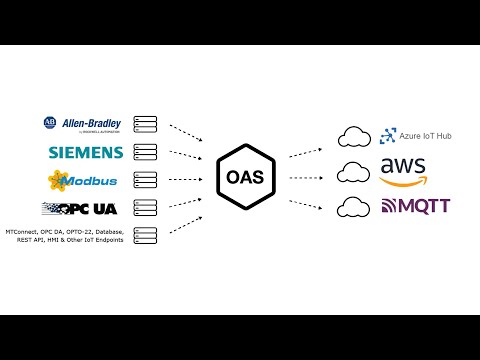
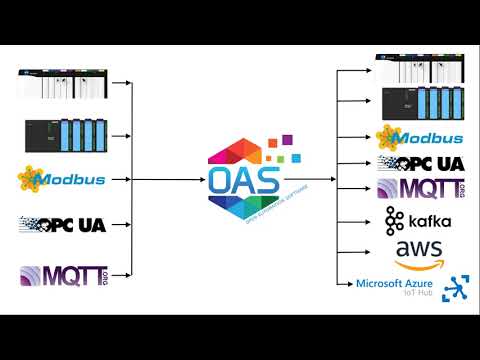
Collect data from Allen-Bradley and Siemens PLCs, Modbus devices, OPC UA and OPC DA servers, MQTT, Sparkplug B, MTConnect, databases, REST applications, and other industrial data sources supported by the OAS Platform. Bring data from different equipment, protocols, and facilities together before delivering it to Snowflake through a consistent data model.
Stream Data Directly to Snowflake
Send OAS Tag data directly into Snowflake tables using Snowflake's native streaming technology. Data is delivered over a secure HTTPS connection and becomes available in Snowflake within seconds, giving analytics and business systems rapid access to current operational information.
No Staging Files or ETL Pipeline Required
Move data from the plant floor to Snowflake without building file-based staging processes or custom ingestion applications. OAS streams rows directly into Snowflake, simplifying the architecture between industrial systems and your cloud data platform.
a server-based, highly-scalable, network platform that enables the transport and transformation of your data
Data HistorianAchieve fault-tolerant logging, zero data loss, and multi-destination storage with our high-performance Store and Forward technology.
Visualization ToolsBuild Visualizations, User Interfaces, and server configuration interfaces for .NET, web technologies, native iOS and Android mobile apps
Device & Data ConnectorsThe OAS Platform provides rapid communications and connectivity to a wide variety of PLCs, devices, and databases.
IoT ConnectorsConnect to cloud-base IoT gateways such as AWS, Azure IoT Hub, Azure Event Hubs, Kafka, and more.
Alarm Logging & NotificationCapture events on each data point, log to open formats for historical analysis and archiving, and trigger real time notifications
SDKs & APIsExplore a wide variety of Developer Tools and APIs to allow you to create applications and system integrations to execute in any environment.
Networking FeaturesOpen Automation Software implements edge computing with a Distributed Network Architecture.
Download a fully functional trial of Open Automation SoftwareKey Features & Benefits
Secure Authentication
Connect securely to Snowflake using key-pair authentication or Snowflake Programmatic Access Tokens. Key-pair authentication is ideal for unattended production systems and avoids relying on passwords or frequently renewed credentials.
Flexible Data Mapping
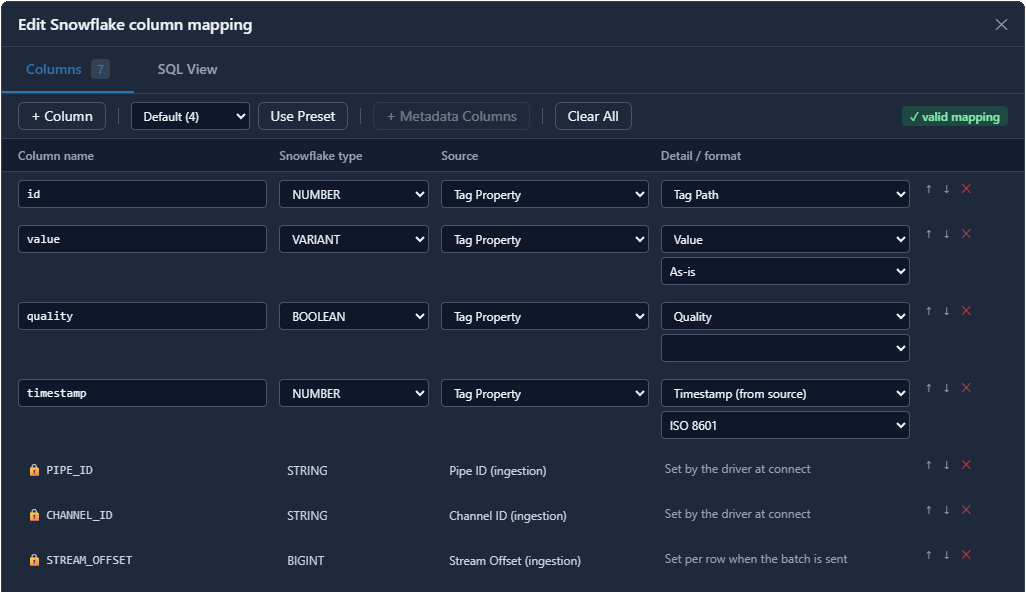
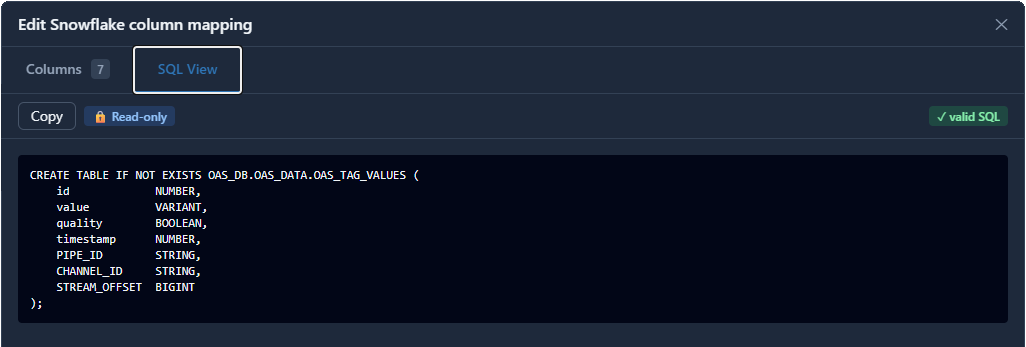
Choose exactly how your industrial data appears in Snowflake. Map tag values, timestamps, quality, equipment information, custom properties, and other metadata to the Snowflake columns that make sense for your organization. Use an existing Snowflake table or quickly generate the table structure required for your selected data.
ISA-95 Style Equipment Context
Turn raw industrial values into data that is easier for enterprise applications to understand. OAS can automatically include ISA-95 equipment hierarchy information with your real time data. This allows operational data from multiple machines, production lines, and facilities to arrive in Snowflake with context already attached.
Reliable Data Delivery
Maintain continuity when systems restart or network connections are interrupted.The OAS Snowflake Connector tracks successfully delivered data and automatically resumes transmission from the correct point when communications are restored, helping prevent missing or duplicate records.
Store and Forward
Optionally enable OAS Store and Forward to buffer industrial data locally when Snowflake or the network is temporarily unavailable. When connectivity returns, OAS automatically forwards the buffered data in order, helping preserve valuable production history through temporary outages.
Shape Your Snowflake Data
Choose exactly what industrial data you send to Snowflake and how it is organized.
The OAS Snowflake Connector maps real-time OAS Tag data directly to the columns in your Snowflake tables, giving you control over the structure and context of your data without building custom payloads or transformation code.
Map the Data You Need
Each property can be mapped to the Snowflake column that best fits your data model. Select from a wide range of OAS Tag information, including:
- Source and system information
- Real-time values
- Timestamps
- Tag names and paths
- Data quality
- Data types
- Custom Tag properties
- Equipment hierarchy
Add Industrial Context with ISA-95 style Equipment Hierarchy
Raw values become much more useful when you know where they came from. OAS can automatically include ISA-95 equipment hierarchy information with each record, including:
Enterprise → Site → Area → Work Center → Work Unit → Equipment
This gives analytics, reporting, and AI applications meaningful operational context without requiring additional processing after the data reaches Snowflake. The standard mapping provides the essential value, timestamp, quality, and Tag identification fields, while the ISA-95 preset creates a richer industrial data model designed for organizing information across equipment, production areas, and facilities.
Common Use Cases
Industrial Data Lake
Centralize operational data from machines, production lines, facilities, and remote sites in Snowflake.
Use OAS at the edge to collect data from diverse industrial systems and deliver it to a common cloud data platform for enterprise-wide analysis.
Manufacturing Analytics
Make production data available to analytics teams without requiring them to connect directly to plant-floor systems.
Stream equipment states, process values, production counts, quality information, energy consumption, and other operational data into Snowflake for dashboards, reporting, and advanced analytics.
Enterprise IT/OT Integration
Bridge the gap between operational technology and enterprise data systems.
OAS provides connectivity to industrial protocols and equipment while Snowflake provides a centralized platform where operational data can be combined with business, supply chain, maintenance, and other enterprise data.
AI and Machine Learning
Build richer AI and machine-learning applications using current industrial data.
Deliver equipment and process data to Snowflake where it can be combined with historical and enterprise information for predictive maintenance, anomaly detection, optimization, forecasting, and other advanced applications.
Multi-Site Data Consolidation
Collect data from multiple plants, production lines, or remote facilities and bring it together in Snowflake.
OAS distributed networking and edge deployment options make it possible to gather operational data close to its source while creating a centralized enterprise data resource.
Learn how thousands of customers are using the OAS Product Platform around the globe to achieve truly open industrial automation
24/7/365
Support
Technical support available by phone, chat, and email
30+ Years
Experience
Product efficacy, market testing, and reliability
Used in 10K+
Data Servers
OAS is used in thousands of businesses worldwide
OAS Platform Features
Cross-Platform Support
The OAS Platform supports multiple operating systems and deployment options, including Windows, Linux, Docker Containers, and can even run on low-footprint devices such as a Raspberry PI 4. This is ideal for IIoT Kafka architectures that need scalability and performance.
Networking
OAS is an edge solution that offers flexible networking options for standalone installations, multi-tenant data aggregation, and even secure unidirectional data transport.
Programmatic Setup
Utilize our .NET SDK or REST API for flexible and automated setup, ensuring full integration with your asset management software. You can also import and export CSV files, which helps you work with Excel and third-party applications.
Calculations, Time On, Counts, and Totals
Merge data from various sources like controllers, sensors, and external databases. You can perform real-time calculations, run logic checks, track time-on states, count transitions, and aggregate analog values without writing a single line of code.
See How We Compare
The initial cost of OAS is far less than our competitors – but the savings don’t stop there. We work with OEMS and System Integrators to provide perpetual licenses with quantity discounts with flexible tag pricing and unlimited client connections.
No Question Left Unanswered
We make getting started with OAS easy - Browse our extensive Knowledge Base of articles on Getting Started as well as How To content that takes you step-by-step through building a solution, and finally learn more about specific features and configurations.
Getting Started - Download, Setup & Support
Step-by-step introduction to using the Open Automation Software platform
An overview of the Snowflake Connector product and configuration options. A comprehensive guide of all features and settings.
A series of step-by-step articles demonstrating how to configure OAS for Data Transfer, Data Logging, and more.
Related Videos